server side tracking 16 min read
Server Side vs Client Side Tracking for Local Ads
Server side vs client side tracking explained for local advertisers. Compare accuracy, setup complexity, and when each approach actually pays off in 2026.
On this page
- What Server Side and Client Side Tracking Actually Mean
- How Each Method Handles a Click and a Conversion
- Accuracy and Signal Loss Side by Side
- Why Server Side Does Not Replace Client Side
- Building a Hybrid Stack Without Overengineering It
- Matching the Right Method to Local Ad Goals
- Choosing the Right Starting Point for Your Business
Most advice on server side vs client side tracking is too neat. “Use a hybrid setup” is directionally right, but it's also where weak recommendations go to hide. For local service advertisers, the better question is simpler: which events are you losing, which ones matter to bidding, and when does extra tracking infrastructure stop paying for itself?
I've set this up for businesses that live on booked jobs, missed calls, estimate requests, and follow-up inside a CRM. In that world, server side tracking is valuable, but it's also easy to overspend on it. If your budget is small and your conversions happen right on the page, a clean client-side setup often gets you most of the way there. If your real conversion happens later, off-page, or after staff follow-up, browser-only tracking will leave holes you can't ignore.
The hard part isn't picking a winner. It's deciding where conversion truth should come from and how much engineering burden your team can carry.
What Server Side and Client Side Tracking Actually Mean
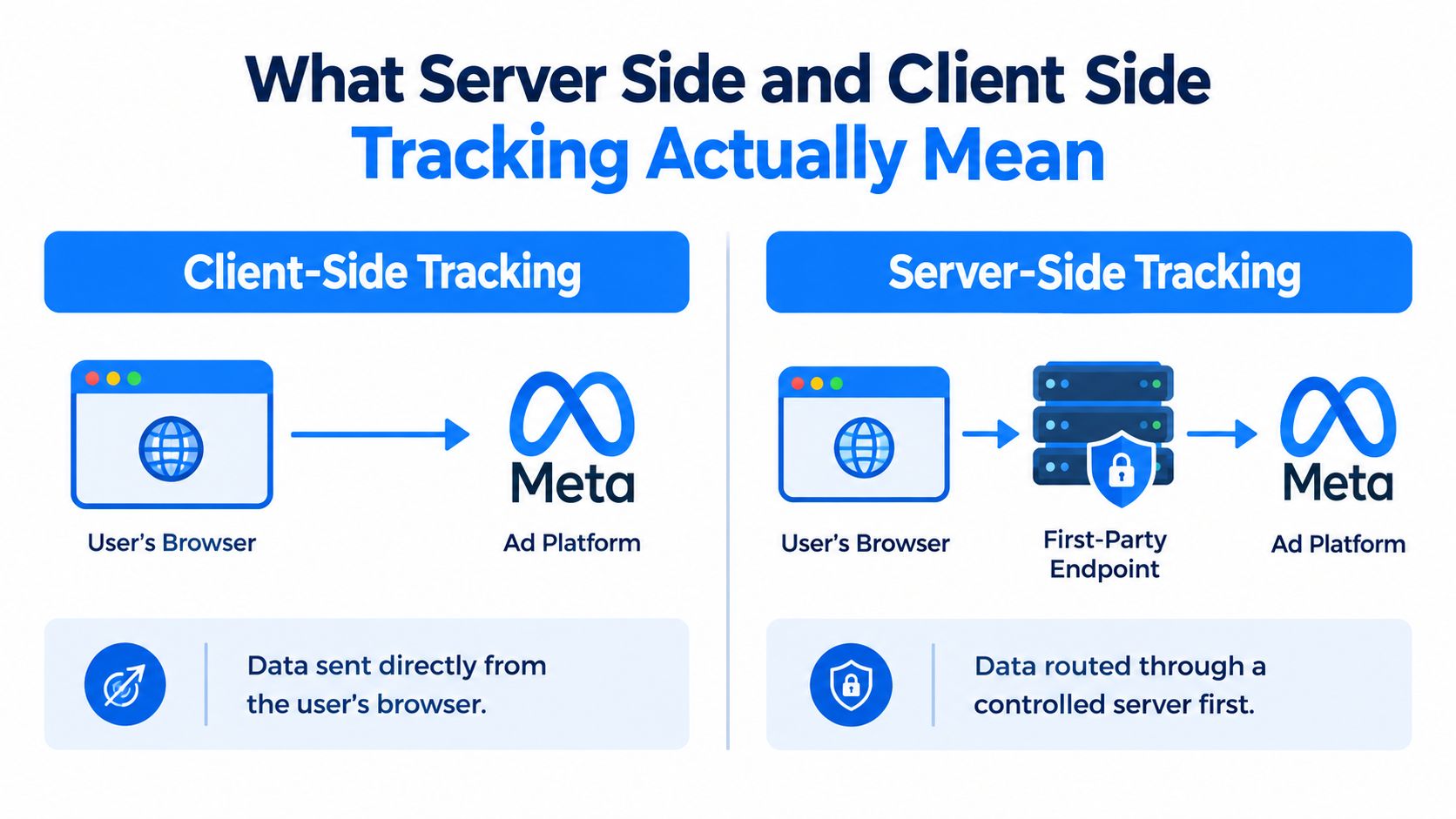
Client-side tracking means the visitor's browser runs a pixel, tag, or script and sends event data directly to an ad or analytics platform. Meta Pixel, Google tags, and many call tracking scripts work this way. The browser sees the page, detects the click path, reads browser context, and fires the conversion from the device itself.
Server-side tracking changes the route. The browser or your backend sends data to a controlled endpoint first, and that endpoint forwards the event to Meta, Google Analytics 4, or another destination. Google's own documentation distinguishes this architecture from client-side tagging because the browser is no longer dispatching everything straight to the vendor. A plain-language comparison of that routing model appears in this server-side vs client-side tagging explainer.
The practical difference for a local advertiser
This isn't an abstract architecture debate. It decides how a booked quote request, financing application, or inbound call gets tied back to the ad click that created it.
If you run Google Ads for emergency plumbing or Meta ads for HVAC tune-ups, your setup has to answer three questions:
- What happened on the page: Did the person land, scroll, click, start a form, or submit it?
- What happened after the page: Did they schedule, answer a text, pick up the phone, or become a real lead?
- What gets sent to platforms: Which events should Google Ads and Meta receive for optimization?
Where each method is strongest
A browser tag is still the fastest way to capture on-page behavior. It sees pageviews, button clicks, referrers, UTMs, and session flow with very little friction.
A server endpoint is better when you need control. It lets you filter data, enrich it with CRM details, and forward backend-confirmed conversions instead of relying only on browser execution.
Practical rule: If the event matters for bidding and can happen after the session ends, don't trust the browser alone.
There's also a bigger industry reason this debate matters now. In the HTTP Archive 2024 cookies report, about 61% of cookies were third-party and 39% were first-party across the top one million websites, with a median of nine to ten cookies per site overall. That same dataset reported a median desktop cookie size of 37 bytes in June 2024. Small browser-stored identifiers still carry a lot of measurement weight, and they're increasingly fragile.
How Each Method Handles a Click and a Conversion
A local ad click looks simple on the surface. It isn't. The data path changes a lot depending on whether you rely on the browser or route events through a server.
| Step in the Journey | Client-Side Tracking | Server-Side Tracking |
|---|---|---|
| Ad click | Platform click data lands in the browser and may set identifiers | Click data can be captured for later use by your site or backend |
| Landing page visit | Pixel or tag fires from the browser | Browser can still send a basic event, but your endpoint becomes the handoff point |
| Page interaction | Browser captures pageview, referrer, UTMs, button clicks, session details | Browser or backend sends interaction data to your controlled server endpoint |
| Conversion action | Form submit or thank-you page event fires from the browser | Event can be sent from the browser, backend, CRM, scheduler, or webhook |
| Delivery to platform | Browser sends the conversion directly to Meta, Google, or analytics | Server container or API forwards the event to the platform |
| Match and attribution | Depends on browser state, cookies, consent, blockers, and session continuity | Depends on server payload quality, identifiers, and deduplication setup |
| Failure point | Browser blocks, script interference, missing thank-you page loads | Bad event mapping, missing IDs, poor deduplication, or webhook failures |
What happens in client-side tracking
The ad gets clicked. The user lands on the site. The browser loads Meta Pixel, Google tags, or GTM web container scripts. Those scripts read what they can from the page and fire events when triggers are met.
That setup is fine for direct form fills and same-session actions. It's weak when the person visits, leaves, comes back later, calls from a saved number, or books after an SMS follow-up.
For home-service campaigns with delayed decisions, that gap matters. If you market HVAC services with financing, maintenance plans, or quote requests, users often convert after the first visit. That's one reason campaign reporting gets messy in local lead gen, and it's part of what makes HVAC marketing performance harder to judge from browser-only data.
What happens in server-side tracking
The click still starts in the browser, but the conversion doesn't have to end there. Your site or CRM can hold onto the important identifiers, then pass a structured event into a server endpoint when the lead becomes meaningful.
That endpoint can do three useful things before forwarding the event:
- Deduplicate: Prevent the browser event and server event from counting as two conversions.
- Enrich: Attach available first-party details from a form, scheduler, or CRM.
- Filter: Decide which events are worth sending to ad platforms at all.
Backend-confirmed events matter most when the conversion happens after staff involvement, not just after a page load.
Where the two paths diverge
A same-session form fill is usually easy for client-side tracking. A booked appointment a week later is not. Once the person changes devices, clears cookies, or re-enters through branded search, the browser trail weakens.
Server side doesn't magically restore every missing connection. It does give you a better shot at sending the conversion from the system that knows it happened.
Accuracy and Signal Loss Side by Side
Accuracy problems in local lead gen usually start with missing events, not bad dashboards. If 15 out of every 100 real leads never make it back to Google or Meta, your bidding model is training on an incomplete sample. That matters more than another reporting view.
Client-side tracking is the first place signal drops. Browser privacy controls, ad blockers, cookie limits, script conflicts, and users switching devices all cut event capture. Analysts at Stape note that browser-based setups commonly miss conversions for exactly those reasons, while server-side setups improve delivery because events are sent from your server environment instead of relying only on the user's browser in this overview of client-side vs server-side tracking.
| Tracking Method | Typical Signal Outcome | Common Sources of Signal Loss |
|---|---|---|
| Client-side tracking | Strong browser context, but more dropped events in the wild | Ad blockers, browser privacy controls, cookie restrictions, script failures, session breaks |
| Server-side tracking | Better event delivery, especially for delayed or CRM-confirmed conversions | Weak identifiers, bad event mapping, consent limits, broken deduplication, poor offline match quality |
What that means in local services
For local service advertisers, browser-only setups often lose enough signal to distort bidding, but not enough to justify a heavy server-side build on every account.
Here is the practical range I see. On a simple same-session form funnel, adding server-side usually recovers a modest slice of missed conversions. On call-heavy campaigns, quote requests that turn into booked jobs later, or leads that get qualified inside the CRM, the recovery can be much bigger because the browser was never the full source of truth to begin with.
The mistake is assuming every recovered event has the same value.
If you spend $1,500 per month and close leads directly from a basic form, server-side can become an expensive way to recover a small amount of extra signal. If you spend $8,000 per month across Google Ads, Local Services Ads support campaigns, and Meta retargeting, and half your real value happens after the form submit, missing those events costs more than the implementation does.
Where server-side helps and where it disappoints
Server-side tracking improves transmission. It does not guarantee clean attribution or high-quality matching.
Independent Meta-focused testing from Meta tracking comparison found that server-side setups can recover more event flow in restricted environments, but match quality depends heavily on the identifiers you pass. That is the part small local advertisers miss. Sending more events sounds good until weak email capture, inconsistent phone formatting, or sloppy deduplication starts feeding platforms low-confidence conversion data.
Poorly configured server-side tracking can waste money in two ways. First, you pay setup and maintenance costs to recover a small amount of extra signal. Second, you can make optimization worse if the platform gets more conversion events but less certainty about who converted.
More transmitted events help only when the events are real, deduplicated, and tied to usable identifiers.
The useful comparison is not client side versus server side in the abstract. It is signal recovered versus cost added. For many local businesses, client-side tracking gets the first 70% to 90% of what matters. Server-side earns its keep when it recovers the missing portion tied to booked calls, qualified leads, and CRM-confirmed revenue, not when it is installed just to follow a trend.
Why Server Side Does Not Replace Client Side
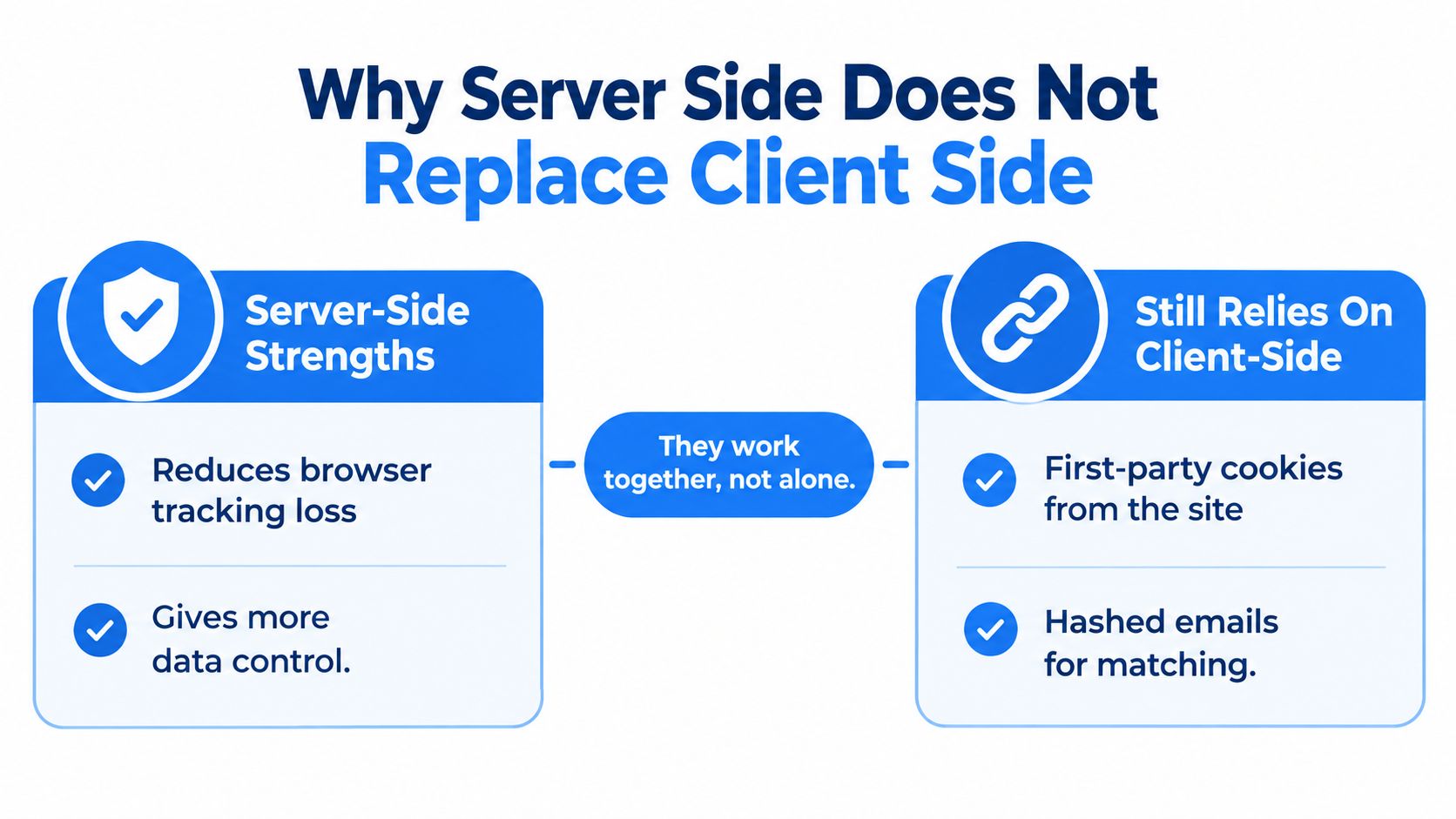
The loudest misconception in server side vs client side debates is that server side replaces the browser. It doesn't. It adds a recovery and control layer.
A neutral guide on the topic points out that client-side tracking still captures browser context such as page behavior, UTMs, referrer data, and session signals, while server-side tracking mainly improves governed first-party delivery, CRM enrichment, and signal control. The same guide also says server side does not magically restore all blocked or unconsented data in this comparison of reliable GA4 data approaches.
What still depends on the browser
You still need the page to provide context. UTMs, referrers, page sequence, scroll behavior, button clicks, and many session-level signals originate in the browser. If the browser never captures them, your server container doesn't invent them later.
That matters for local landing pages where ad message match, page engagement, and form interaction influence optimization decisions. A server endpoint can forward a conversion. It can't fully reconstruct the visit experience on its own.
Why replacement thinking creates expensive mistakes
Teams get sold on “move everything server-side” and end up with brittle setups. They reduce visibility into simple page events, add maintenance overhead, and still discover they need browser tags for core context.
The other problem is observability. A buggy web tag is usually easier to spot because the page visibly breaks or the platform debugger complains fast. A broken server container can drop conversions until someone notices reporting drift.
- Missing deduplication: Browser and server both fire the same lead. Your platform counts too much.
- Weak enrichment: Server events arrive with poor identifiers, so match quality drops.
- Operational burden: Someone still has to test changes, monitor failures, and reconcile CRM truth.
Server side is a recovery layer. Treating it like a total replacement is how small advertisers pay for complexity they can't monitor.
Building a Hybrid Stack Without Overengineering It
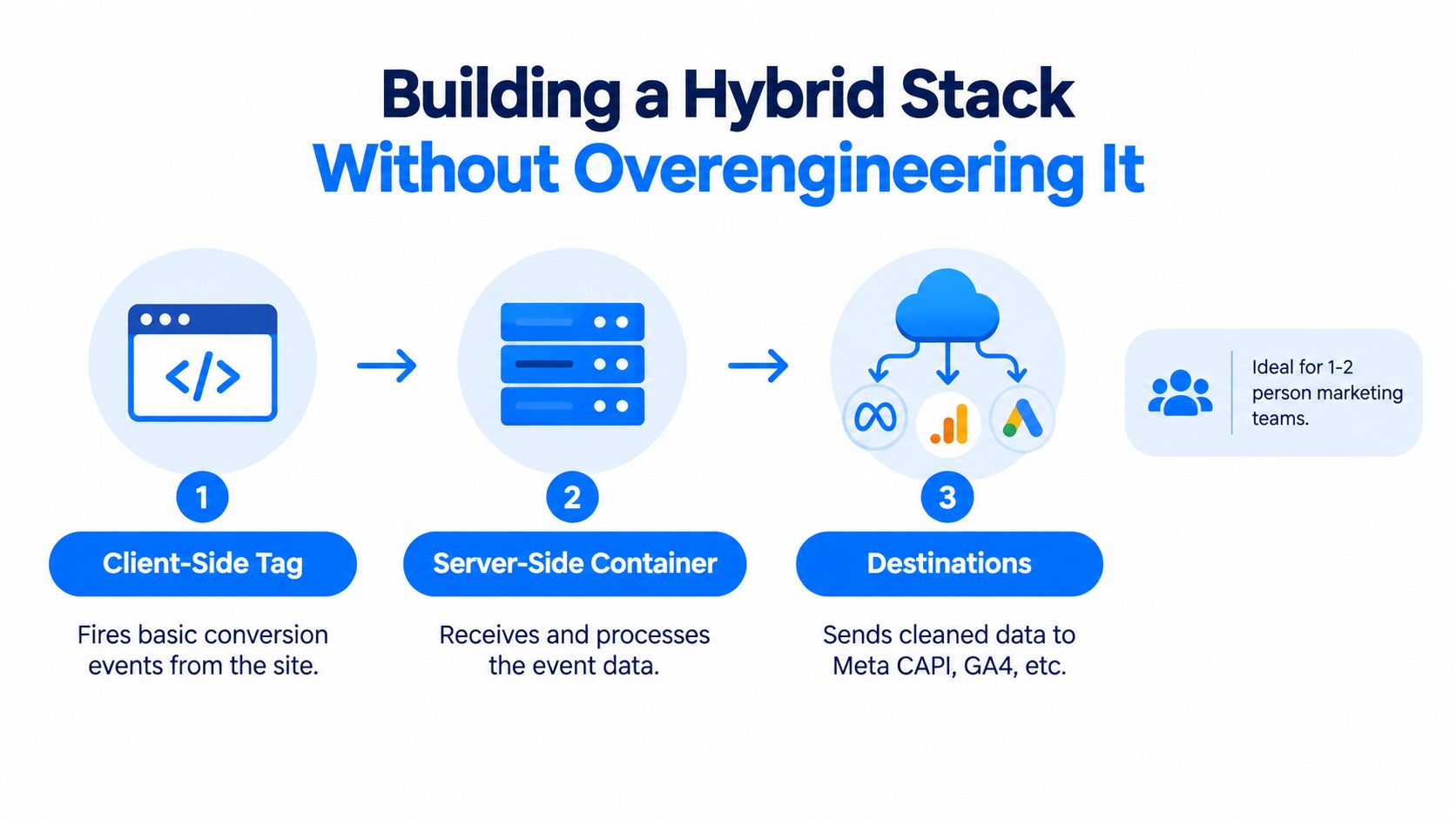
A workable hybrid stack for a local advertiser isn't glamorous. It's a browser tag for context, a server path for important conversions, clean deduplication, and consent handling that doesn't create chaos.
That's enough for most one- or two-person teams.
What a sane hybrid setup includes
Start with the basics:
- Browser tagging for page context: Use Meta Pixel, Google tags, or a GTM web container to capture pageviews, form starts, and visible on-page actions.
- Server-side forwarding for key outcomes: Send booked appointments, qualified leads, and CRM-confirmed conversions through Meta Conversions API, GA4 Measurement Protocol, or webhook-based routes.
- Deduplication with event IDs: If the browser and server both report the same conversion, they need a shared event identifier so platforms can merge them correctly.
- Consent routing: Your consent tool should determine what can fire in the browser and what can be sent through approved server-side routes.
What vendors gloss over
Server side gets oversold. The technical setup isn't impossible, but it's not free maintenance-wise.
You still have to account for operational chores such as:
- Hosting and uptime: A server container or endpoint has to stay available.
- Debugging logs: When events stop showing up, someone needs enough retained detail to trace the failure.
- Mapping discipline: CRM fields, scheduler events, and ad-platform event names need to line up.
- Change management: New landing pages, forms, and booking tools can break tracking.
That's why I don't recommend chasing a “full stack” setup too early. For many trades, the smarter move is a compact hybrid implementation that sends only the events that matter most for optimization.
Where small teams should stop
If your team is tiny, don't build a measurement lab. Build a reliable path for high-value conversions.
For a plumber, cleaner, or electrician, that often means:
- browser tracking for visits and form activity
- server-side event delivery for booked jobs, estimates, or CRM-qualified leads
- one source of truth for whether a lead counted
A platform like benjiads fits this category because it combines server-side and client-side signals inside a local-service ad workflow rather than forcing the business to assemble every component separately. That matters most for trades already juggling landing pages, follow-up, and paid traffic, especially in markets like plumber advertising.
Matching the Right Method to Local Ad Goals
Not every conversion deserves the same tracking method. The right answer depends on where the event happens and how far it sits from the original click.
Website lead form submission
- Client Side
- Good at capturing immediate submit events and page context
- Server Side
- Good for forwarding enriched lead data and deduplicating
- Recommended
- Hybrid
Booked appointment through a scheduler
- Client Side
- Often misses or weakly captures off-page bookings
- Server Side
- Strong when scheduler or webhook sends the booking event directly
- Recommended
- Server side first
Phone call from the ad landing page
- Client Side
- Can capture click-to-call interactions on page
- Server Side
- Better for tying call outcomes or CRM stages back to campaigns
- Recommended
- Hybrid leaning server side
Offline qualified lead or sale in CRM
- Client Side
- Weak unless manually imported later
- Server Side
- Strongest option because the CRM owns the actual outcome
- Recommended
- Server side
On-page engagement like scrolls or button clicks
- Client Side
- Strongest and simplest
- Server Side
- Usually unnecessary unless heavily customized
- Recommended
- Client side
Walk-in or store-visit style local intent signals
- Client Side
- Better for immediate session behavior and traffic context
- Server Side
- Limited unless connected to another first-party system
- Recommended
- Client side
Bookings and off-page conversions
If someone books through Calendly, a field service scheduler, or a separate form tool, the browser often isn't the best source of truth. The conversion may happen off your main site, after redirects, or in a flow where browser tags aren't consistently preserved.
Server side wins here because the booking system or backend can tell the platform the appointment happened.
Lead forms on your site
This is the classic hybrid case. Client side should still fire the visible submit event because it captures immediate conversion behavior and browser context. Server side should add the confirmed lead record if your form creates one in the CRM.
That combination gives platforms both speed and stronger confirmation.
Calls and CRM stages
For local services, server side earns its keep. A click that turns into a phone call may leave almost no usable browser trail after the fact. If your staff marks the call as booked, quoted, or qualified inside the CRM, that outcome belongs in a server-side pipeline.
Optimize for the event furthest from the click. Keep page behavior in the browser, and route business outcomes through the server.
Choosing the Right Starting Point for Your Business
Most businesses don't need the same setup on day one. The right starting point depends on ad spend, team capacity, and how your leads close.
Start with client side if your setup is simple
If your budget is modest, your team is small, and most conversions happen on-page, start with a clean client-side setup. Install Meta Pixel correctly. Configure Google tags correctly. Make sure forms, thank-you states, and core lead events fire.
That's still the fastest path to usable data. It's also easier to troubleshoot.
Move to hybrid when reporting stops matching reality
Once your leads start booking later, moving through a CRM, or converting after follow-up, browser-only reporting becomes less useful. That's when hybrid stops being optional and starts being practical.
Recent coverage on privacy-first analytics says browser restrictions, ad blockers, and cookie limits have made client-side data less complete, and one 2026 source claims ad blockers intercept more than 40% of sessions in key markets while Safari limits JavaScript-set cookies to seven days in this privacy-first tracking overview. The more delayed your conversions are, the more those limits hurt.
For businesses chasing actual booked jobs instead of just form fills, hybrid is usually the smartest middle ground. That's especially true if you're already trying to improve home service lead generation and need the ad platforms to optimize around outcomes that happen after the first session.
Go server-side first when offline attribution drives the business
If your business depends on call outcomes, CRM stages, or scheduled jobs that happen after staff involvement, server-side reporting should be part of the initial plan. Not because it's fashionable. Because your key conversion doesn't live in the browser.
My recommendation is direct:
- Use client side first if most conversions happen immediately on the site and your team needs simplicity.
- Use hybrid if you want better signal durability without turning marketing into an engineering project.
- Use server-side first if your real conversion is confirmed in a backend system and ad platforms need that event to optimize spend properly.
Meta usually benefits more visibly from enriched lead signals in local lead gen. Google still needs enhanced conversions configured well regardless of which stack you pick.
Don't buy complexity because a vendor says modern tracking requires it. Buy it when your current reporting can't describe how your business wins jobs.
If you want this set up without stitching together pixels, webhooks, follow-up, and landing flows by hand, benjiads offers a combined local-service ad system that uses both server-side and client-side tracking. It's built for businesses that need campaigns tied back to real leads and bookings, not just page events.
- server side tracking
- client side tracking
- ad measurement
- conversion tracking
- Meta tracking
Done for you
Ads that text you customers.
- ✓ Ads created for you
- ✓ Every lead texts your phone
- ✓ Free to use, no credit card
748+ local businesses run ads with benjiads