server side tracking 10 min read
What Is Server Side Tracking and Why It Matters Now
Learn what is server side tracking, how it differs from browser pixels, and why local advertisers care about consent, attribution, and better data quality.
On this page
- Why Your Ad Dashboard and Your Inbox Disagree
- How Browser Limits Reshaped Ad Tracking
- What Server Side Tracking Actually Does
- Server Side vs Client Side Tracking Compared
- Why Consent Still Applies on the Server
- Why Local Service Advertisers Care
- Implementation Choices for a Small Business Stack
- Decisions to Make Before Turning It On
Server-side tracking is data collected on your own backend and forwarded to ad platforms via server-to-server APIs. In major markets, the share of websites using no server-side tracking was 5% in the US, 8% in the UK, and 10% on the EU average in a 2026 tracking report, which shows how quickly this has moved from niche to mainstream.
You've probably seen the symptom already, your inbox is full of booked jobs, but Meta or Google says the campaign barely converted. That mismatch usually means the browser lost part of the story, not that the campaign failed.
Why Your Ad Dashboard and Your Inbox Disagree
A plumber can run Meta ads, book 18 jobs in a week, and still see only 9 conversions in Ads Manager. That gap is frustrating, but it usually comes from tracking loss, not from the ads magically underperforming.
The browser is a messy place to measure anything. iOS app tracking limits, Safari's privacy controls, ad blockers, and cookies expiring before the attribution window closes can all prevent a pixel from firing or identifiers from surviving long enough to be matched.
What the browser is missing
A browser pixel lives inside the visitor's browser, so it depends on scripts, cookies, and device signals that can disappear. Server-side tracking moves the event capture to your own backend, then forwards it to platforms through server-to-server APIs, so the conversion can be recorded when the booking, form fill, or invoice happens. That's why the browser side and the inbox often disagree: the event happened, but the pixel didn't get the full signal.
Think of the browser as a courier with a fragile envelope. If the envelope gets torn, blocked, or delayed, the delivery never reaches the ad platform in usable form. The backend is the office copy, and server-side tracking sends that copy after you've checked it, cleaned it up, and decided what should leave the building.
Practical rule: if the lead exists in your CRM but not in your ad dashboard, treat it as an attribution gap first, not an ad failure.

How Browser Limits Reshaped Ad Tracking
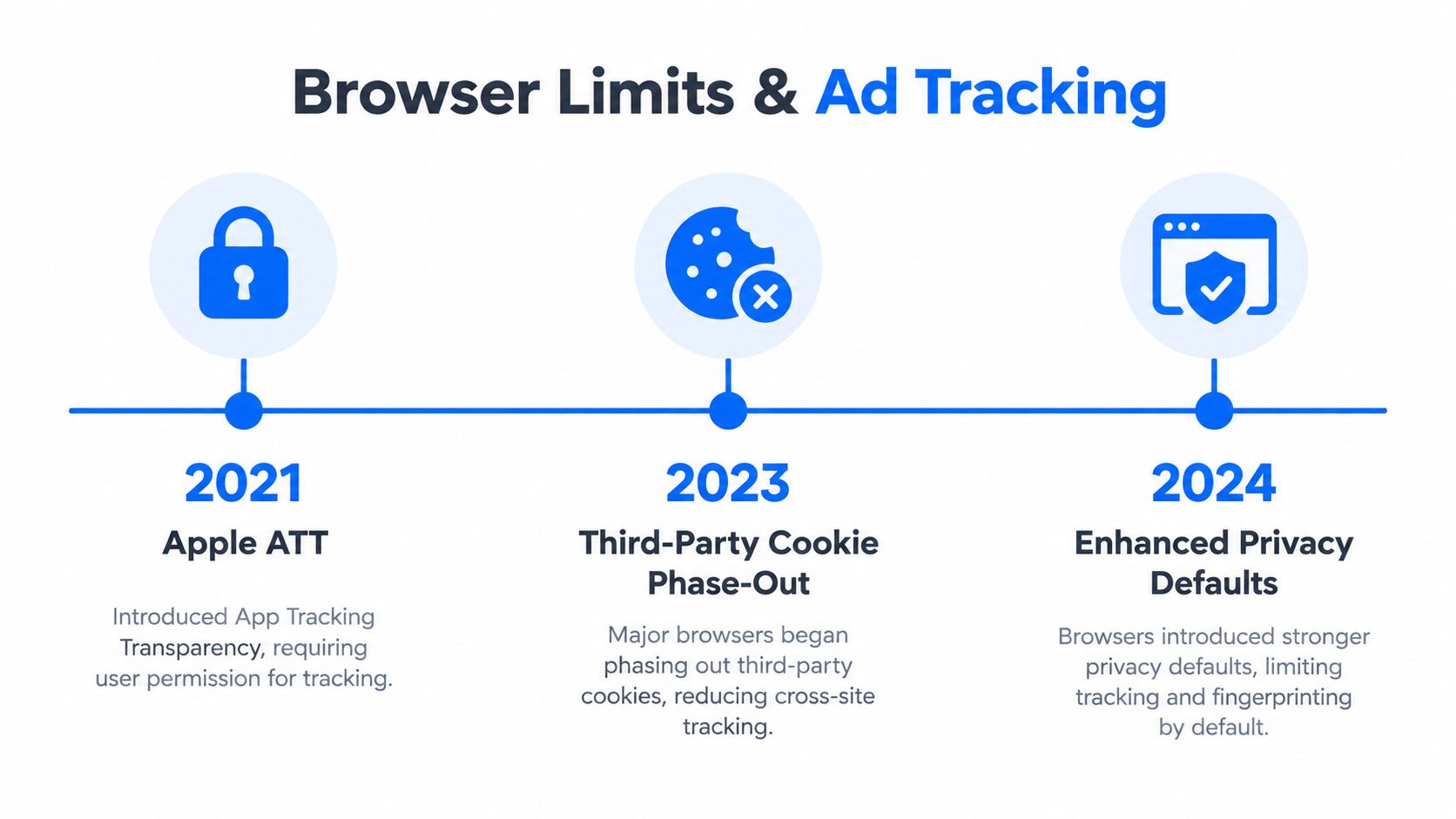
Privacy changes didn't happen in one clean wave. They stacked on top of each other, and each one made browser-based measurement a little less reliable.
The squeeze on client-side signals
Apple's App Tracking Transparency changed how apps ask for permission before sharing the IDFA. Safari's Intelligent Tracking Prevention shortened cookie lifespans and limited cross-site tracking. Chrome's third-party cookie phase-out pushed advertisers further away from easy browser identity.
Ad blockers made the problem more invisible. They don't just block annoying banners, they can strip the pixel before it ever fires, which means the conversion never enters the analytics stream at all.
When the browser stops being a dependable source of truth, the business's own systems have to carry more of the measurement load.
That's where server-side tracking came in. If your own server sees the form submission, the booking confirmation, or the paid invoice, it can send that conversion directly to Meta or Google even when the browser layer is incomplete. The whole point is not to replace measurement, but to preserve it when the client-side path breaks.
What Server Side Tracking Actually Does
The cleanest way to understand server-side tracking is to follow one event from start to finish.
Step by step flow
First, your website, app, CRM webhook, or POS sends an event to your own backend. That backend can be a server-side Google Tag Manager container, a hosted gateway, or a custom endpoint on infrastructure you control.
Second, the server enriches the event. It can attach hashed contact fields like email or phone, normalize the user agent and IP, and check consent state before anything leaves your property.
Third, the server forwards the event to a destination such as Meta's Conversions API, Google Ads server-side endpoints, or another ad platform API. Deduplication keys help prevent the same conversion from being counted twice if a browser pixel also fired.
Fourth, the server keeps logs. That matters because the team can audit what was sent, what was redacted, and what was dropped.
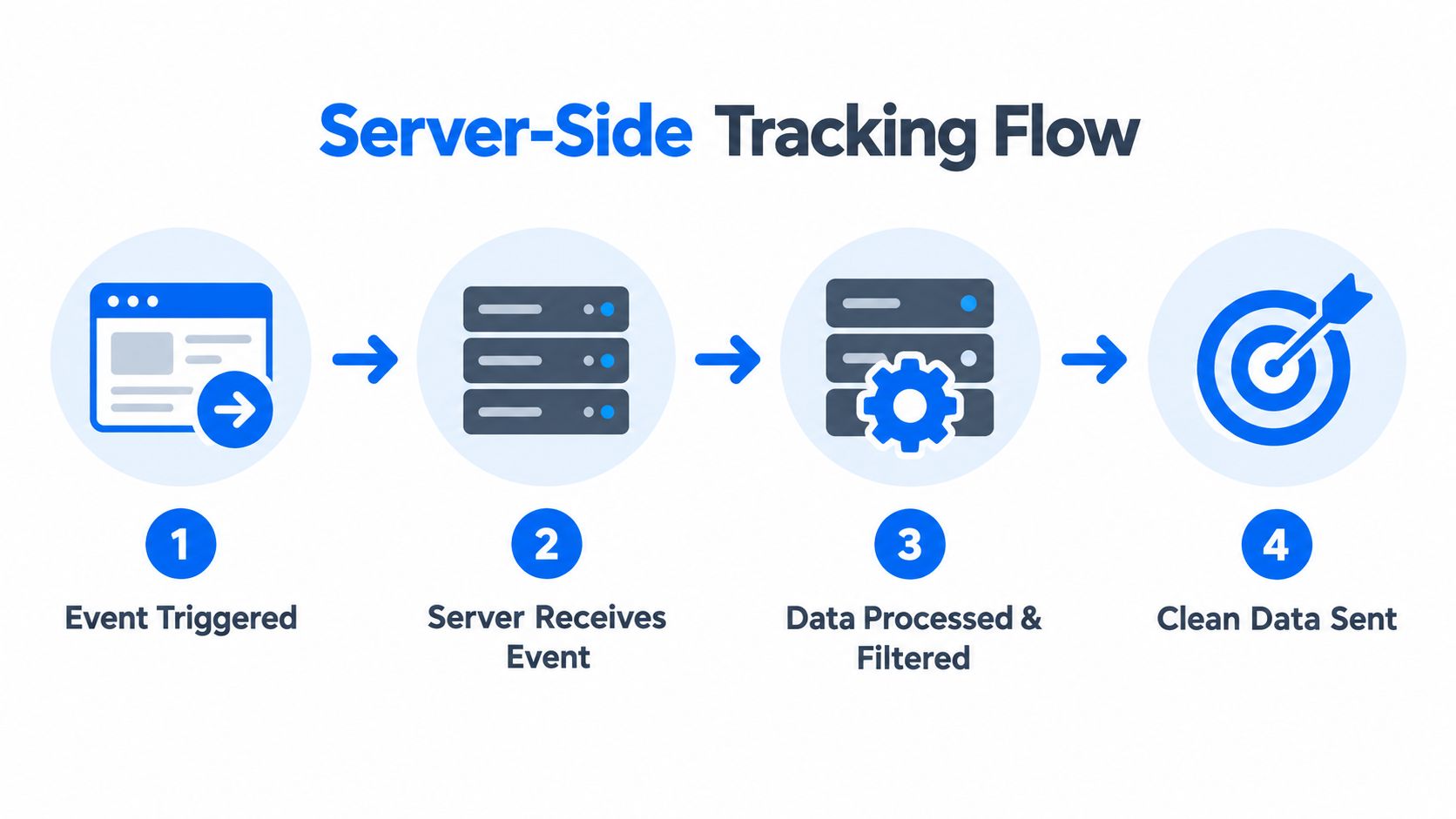
The middle layer is where the control lives. If you want to enrich one field, suppress another, or drop a record entirely, that's the place to do it. A local advertiser should care about that because it's the difference between forwarding raw personal data and forwarding a tightly governed event payload.
Server Side vs Client Side Tracking Compared
The choice isn't “old vs new.” It's “browser-first vs backend-first.” Both can work, but they solve different problems.
| Dimension | Client-Side Tracking | Server-Side Tracking |
|---|---|---|
| Reliability | Depends on the browser, scripts, cookies, and ad blockers | More resilient when the event is captured on your own systems |
| Consent handling | Needs in-page consent before tags fire | Can check consent before forwarding data onward |
| Complexity | Simpler to launch | More setup, more governance, more control |
| Best use case | Session behavior, upper-funnel audiences, quick implementations | Bookings, CRM leads, offline imports, verified conversions |
Client-side tracking still has a place. It's useful when you want fast browser-level signals, remarketing audiences, or lightweight implementation. Server-side tracking becomes stronger when you care about logged-in flows, form fills, bookings, paid jobs, and any conversion that already exists in your own systems.
If you want a deeper buying guide for tracking software, this comparison sits well alongside the broader options in ad tracking software. The key is to choose consciously instead of chasing the newest acronym.
Simple test: if your conversion lives in a CRM, booking tool, or checkout backend, server-side usually deserves a seat at the table.
Why Consent Still Applies on the Server
Moving tracking server-side does not make consent optional. That's the mistake many owners make, and it's the fastest way to turn a technical fix into a governance problem.
European guidance in 2024 and 2025 made the point clearly, server-side collection doesn't remove consent obligations, and device access or personal-data processing can still trigger legal requirements. One industry summary also notes the EU device-access rule in § 25 TDDDG, renamed from TTDSG in May 2024, and says GDPR still applies whether the data is handled in the browser or on a server. etracker's summary of server-side tracking and EU consent rules captures that reality well.
What consent needs to do
The server should receive the consent state from the page, store it with the event, and decide whether the payload can be forwarded. If consent is missing, user identifiers should be redacted or the event should be discarded, depending on the rule you've defined.
That's especially important with Meta Conversions API and Consent Mode workflows. The server needs to know what the user agreed to before it sends anything to a third party. If your CRM or booking system forwards leads server-side without a consent flag, you've built a privacy leak that will eventually show up in platform audits or internal reviews.
This is not just a legal detail. It changes how the whole stack should be built. Consent state has to travel with the event, not sit in a separate banner log that nobody checks.
Why Local Service Advertisers Care
Local service businesses don't get paid for impressions. They get paid for booked jobs, filled calendars, answered calls, and qualified leads that turn into revenue.
That's why server-side tracking matters more for a plumber, dentist, chiropractor, or law firm than many generic guides admit. A browser pixel can tell you a page loaded. A server-side event can tell you a form was submitted, a booking was confirmed, or a lead was verified in the CRM. Those are very different business signals.
From clicks to booked work
A visitor clicks an ad, lands on a page, fills out a form, and the request lands in your booking system. The server can enrich that event with consent state and hashed contact details, then pass a cleaner conversion signal back to Meta or Google. That improves the platform's ability to optimize toward real outcomes, not just shallow on-site actions.
The biggest value is local clarity. Instead of asking “which ad got a click,” you can ask “which campaign generated booked jobs in this neighborhood.” That's the level of detail a local owner uses to decide where to spend next month's budget.
The timing matters too. When conversion data arrives within seconds, SMS follow-up can go out sooner, and the lead-to-job process gets less fragile. If you want a broader view of how tracking setup ties into automation, this local ad stack overview is useful context.
Use server-side tracking to verify the lead, not to pretend every lead is perfect. The value is cleaner optimization and faster follow-up, not magic.
Implementation Choices for a Small Business Stack
A small business usually starts with the managed path. A gateway like Meta's Conversions API Gateway, or a similar hosted setup, removes a lot of plumbing and gets events moving faster.
Practical build options
If you want more control, the next step is a server-side Google Tag Manager container paired with a first-party subdomain and a cloud endpoint. Teams often place the backend on tools like Cloud Run or AWS Lambda, then route web and CRM events through the server layer before sending them onward.
The useful question is simple. What do you need to route, redact, and verify without breaking the business? For many local advertisers, that means deciding which events stay client-side for immediate bidding signals, and which ones should move server-side because they are tied to verified outcomes.
Managed gateway
- Best For
- Quick setup, smaller teams
- Effort
- Low
- Control Over Data
- Moderate
Server-side GTM container
- Best For
- More flexible routing and filtering
- Effort
- Medium
- Control Over Data
- High
Custom endpoint
- Best For
- Complex workflows and deeper control
- Effort
- Higher
- Control Over Data
- Highest
What to redact and verify
For local businesses, redaction rules matter as much as platform choice. Drop full URLs if they contain personal IDs, strip raw referrer strings when they are not needed, and avoid sending location precision that is finer than your reporting needs.
Verification should be boring and repeatable. Check deduplication in Meta Events Manager, compare debug output in GA4, and trace one sample conversion end to end from form submit to dashboard. That is how you find out whether the stack is working or just looking busy.
If you are comparing automation platforms that bundle ad generation, tracking, and follow-up, see this automated marketing platform overview.
Decisions to Make Before Turning It On
Before the first event leaves your server, write down the rules. Server-side tracking is not just a cleaner pipe, it is a governance layer, and local advertisers need to decide what data is allowed through it.
Start with the outcomes you want to measure. Name the conversions that mean booked jobs, not just form fills. List every personal field the server collects, then state why each one is needed. Set retention rules for raw IP and user agent data, so logs do not stay around longer than they should. Decide whether SMS and email data share one endpoint or stay separate. Assign one person to review consent banner logs each month.
These choices matter because server-side tracking improves measurement, but it does not repair a weak offer or bad lead handling. It is more like putting a gate at the entrance than repainting the whole store.
Pick one target, such as lead quality or cost per booked job, then check it again after ninety days.
If you want a partner that combines ad generation, campaign launch, tracking, and SMS follow-up for local service businesses, visit benjiads.com and see how the workflow fits your stack.
- server side tracking
- ad tracking
- consent mode
- Meta Conversions API
- attribution
Done for you
Ads that text you customers.
- ✓ Ads created for you
- ✓ Every lead texts your phone
- ✓ 3 days free · $29.90/mo
748+ local businesses run ads with benjiads