advertising for contractors 15 min read
Advertising for Contractors Playbook
Master advertising for contractors with a practical playbook covering channel mix, landing pages, five-minute lead response, and full-funnel tracking.
On this page
Most contractor advertising advice starts with the wrong question: “How do I get a cheaper click?” A low-cost inquiry doesn't help if nobody answers the phone, verifies the job, or follows up while the homeowner is still comparing providers. For a local contractor, advertising is successful only when a qualified inquiry becomes a scheduled estimate and, eventually, profitable work.
That changes the operating model. You need campaigns built around service area, intent, and trade-specific demand, but you also need a response system that moves every lead from ad platform to human contact quickly. The contractors who treat media buying, intake, dispatch, and revenue reporting as one connected workflow will make better decisions than those optimizing cost per lead in isolation.
The Real Bottleneck in Contractor Advertising
The most expensive mistake in contractor advertising isn't always an expensive keyword. It's paying for an inquiry that sits in an inbox until the crew finishes the day's work. By then, the homeowner may have called another provider, accepted a different estimate, or decided that your company isn't responsive enough for the job.
The market structure makes this especially important. In 2023, the United States had 521,315 specialty-trade-contractor establishments with paid employees, employing approximately 4,986,759 people. About 330,654 establishments, roughly 63%, had fewer than five employees, according to U.S. contractor market data published through the Census Bureau. Most contractors aren't running a large marketing department with a dedicated intake coordinator and revenue-operations analyst.
Why small teams need simpler systems
A small plumbing, HVAC, electrical, or remodeling company usually needs advertising that does four things well:
- Stay local: Reach households inside a serviceable radius instead of paying for inquiries the crew can't visit.
- Match intent: Separate emergency calls from planned projects, because urgency and buying behavior differ.
- Capture useful detail: Record service type, location, urgency, and permission to contact the prospect.
- Trigger action: Send the inquiry to the right person immediately, not just to a shared email address.
Broad awareness can support a brand over time, but it won't solve a full schedule next week. Local campaigns, dedicated landing pages, automated lead handling, and a short performance scorecard are more practical for a small operator than an enterprise marketing stack.
Practical rule: Optimize for the next business outcome, not the cheapest preceding event. A qualified, answered inquiry is more useful than a cheap form submission.
The metric that exposes the problem
Cost per lead is an acquisition metric. It tells you what the platform charged to generate an event, not whether your team reached the person, booked an estimate, or won the job. A contractor can reduce cost per lead by broadening targeting or weakening qualification, while steadily filling the pipeline with inquiries outside the service area or below the minimum job size.
The better question is: How much revenue does each verified lead create after the sales process handles it? That requires response time, contact rate, qualification rate, appointment rate, and closed revenue in the same reporting chain.
Google Local Services Ads helped formalize this shift. Google began testing the product in San Francisco in 2015, then expanded it gradually until it reached nearly 50 service verticals and broad U.S. availability by 2018. The lead-based model let eligible providers pay for service inquiries rather than only clicks, making lead cost, response speed, booking rate, and service-area coverage more relevant operating measures. The history is documented in Energy Circle's account of Local Services Ads.
Building a High-Converting Local Campaign Mix
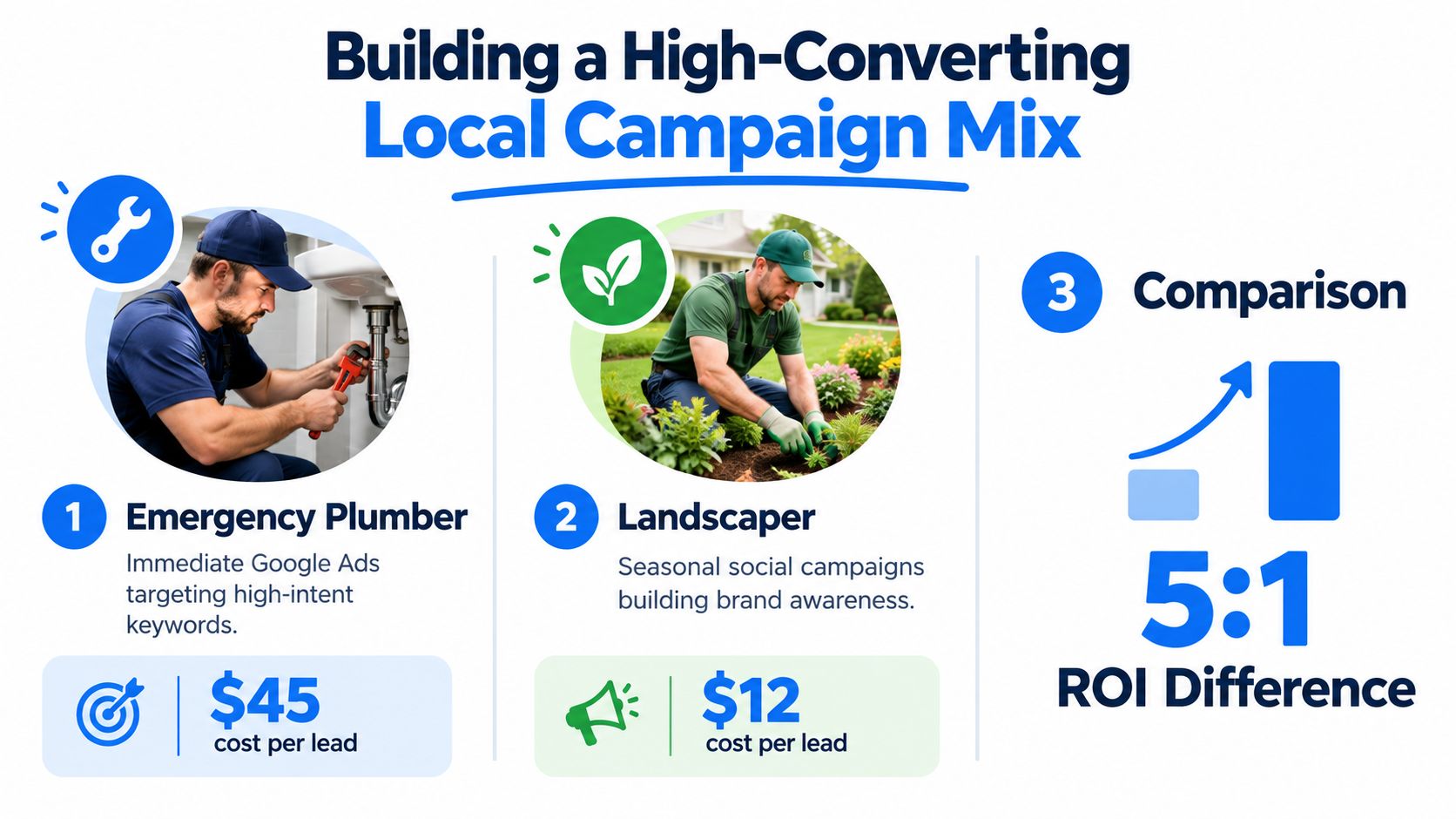
A contractor shouldn't begin with a favorite platform. Begin with the customer's buying situation. An emergency plumber, a lawn care provider selling seasonal maintenance, and a remodeling contractor promoting a planned kitchen project may all serve homeowners, but their campaigns need different messages, timing, and conversion paths.
Start with urgency and service value
For urgent work, search advertising captures demand that already exists. Organize campaigns by service rather than putting every offering into one broad ad group. A plumbing campaign might separate burst pipes, drain clearing, water heaters, and general plumbing, with location settings limited to the areas the team can reliably serve.
For planned work, visual advertising has more room to influence the decision. Before-and-after images, completed project photos, design concepts, and seasonal offers can help a homeowner remember the company before they're ready to request an estimate. Meta campaigns can support that earlier research phase, while search campaigns capture people who have moved closer to hiring.
Build each campaign around one trade and area
Use a repeatable structure, but don't make the message generic. Each campaign should have:
- One primary service: Keep emergency drain repair separate from remodel plumbing or routine maintenance.
- One defined geography: Use service-area boundaries and exclude locations that create unserviceable inquiries.
- One promise: Lead with availability, clear scope, local expertise, or a specific project outcome.
- One conversion action: Choose a phone call, estimate request, or qualified message, then make that action obvious.
- One landing destination: Match the page headline and offer to the ad so the prospect doesn't have to search for relevance.
Lead-based local advertising shifted contractor acquisition toward intent-driven, location-based customer acquisition, because the commercial event is an eligible service inquiry rather than a click alone. That makes coverage and routing central decisions, as described in the development of Google's lead-based local advertising model.
For a more explicit channel comparison, use this Google Ads versus Meta Ads guide to decide which platform fits the service's urgency, creative needs, and buying cycle.
Let the budget follow operational capacity
Don't increase spend just because a campaign produces inexpensive inquiries. First check whether the dispatcher can answer calls, whether estimators can return messages, and whether the service area can absorb more work. An emergency campaign may need tighter hours, call handling, and qualification rules, while a seasonal landscaping campaign may need more visual proof and longer follow-up.
The mix should be resilient, not complicated. Capture urgent demand where search intent is strong, build familiarity for planned services through visual creative, and send both channels into the same qualification and response process.
Designing Landing Pages That Actually Book Jobs
Sending paid traffic to a homepage forces the prospect to do too much work. A homeowner who clicked an ad for electrical-panel repair shouldn't land on a page with a generic company introduction, a long service menu, and no clear next step. The page should confirm relevance immediately and make contacting the contractor feel safe.
Match the page to the job
The headline should name the service and area in natural language. A page for “water heater replacement in [service area]” should not make the visitor interpret whether the company handles that job. Place the phone number and primary action near the top, then repeat the action after the visitor has seen proof and service details.
A dedicated, trade-branded subdomain can make the experience feel more focused than a generic campaign URL. It should still use the contractor's real name, visual identity, service area, and contact details. The page isn't a separate brand. It's a focused route from an ad to an inquiry.
Strong landing pages usually include:
- A direct offer: Explain what the visitor can request, such as an estimate, consultation, or service call.
- A short form: Ask for name, phone, email, service needed, location, and a brief description.
- Qualification fields: Use a service selector, urgency option, and project context where those details affect routing.
- Local proof: Show real work, service-area language, and reviews that help the prospect recognize the business as relevant.
- Trust signals: Include licensing or insurance information only when accurate and current, along with clear contact details and business hours.
- A mobile-first layout: Make buttons large enough to use on a phone and avoid fields that create unnecessary typing.
Reduce friction without accepting every inquiry
Shorter forms usually feel easier, but the shortest form isn't automatically the most profitable. If a contractor needs the city, job type, or urgency to determine whether the request is serviceable, collecting that information early can save time later. The right balance is to ask only for details that change qualification or routing.
Don't hide the phone option. Some urgent prospects want a conversation rather than a form, and a visible call action can prevent them from leaving the page to search for another provider. Use call tracking that connects the ad source to the eventual CRM record, not just a click event.
Your website should support the landing page rather than undermine it. For practical guidance on clarity, mobile usability, and conversion paths, review this small-business website design guide.
Preserve the evidence
Add UTM parameters and platform click identifiers to campaign URLs. Store them with the lead record, then pass the source through qualification, booking, estimate, and closed-job stages. Without that continuity, the ad platform may optimize toward duplicate submissions or low-intent contacts because it can't see what happened after the form.
A landing page is only one part of the conversion path. It creates the opportunity. The intake system determines whether that opportunity becomes a conversation.
Engineering a Five-Minute Lead Response System
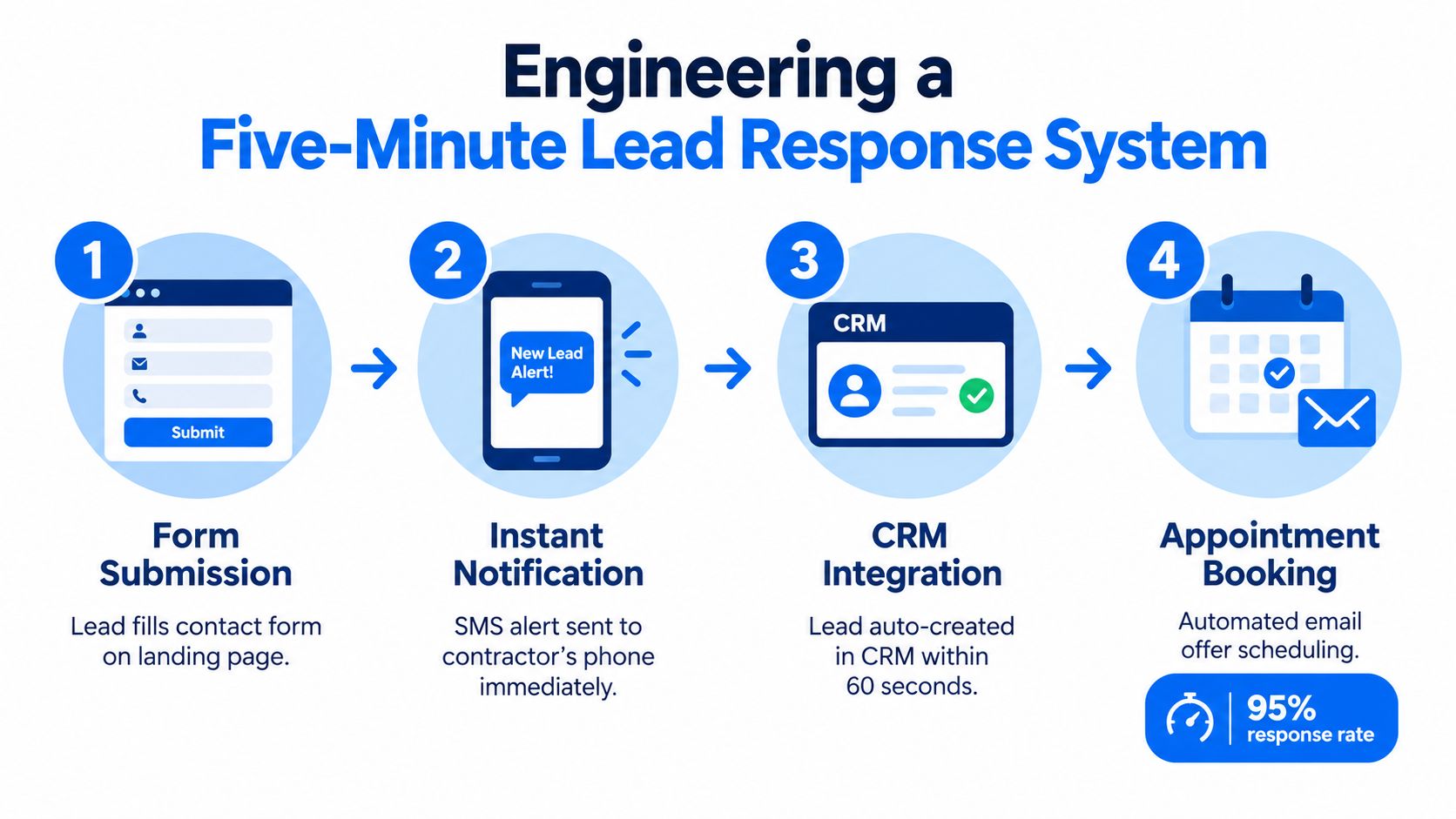
The first five minutes after an inquiry should run like a dispatch procedure, not a memory test. A form submission needs to create an event, notify the right person, verify the contact details, and generate a human call task without waiting for someone to check email.
The evidence supports a strict target. Research covering over 100,000 web-generated leads found that contacting a prospect within five minutes made businesses about 100 times more likely to connect and 21 times more likely to qualify the lead than waiting 30 minutes, as summarized in research on response speed for home-service leads. These are directional benchmarks, not guarantees, because service area, urgency, lead quality, competition, and call quality still matter.
The response sequence
A workable workflow looks like this:
- Capture and qualify: Record service type, location, urgency, phone number, and contact permission. Reject or flag obvious duplicates and requests outside the service area.
- Send an immediate message: Trigger an SMS confirming receipt and setting an expectation, such as a call from the team. The message should identify the business and offer a simple reply path.
- Create the call task: Route the lead to an available owner, dispatcher, or estimator. The system should timestamp receipt, notification, first call attempt, and outcome.
- Continue follow-up: If nobody connects, use timed SMS and call tasks over several days. The sequence should stop when the person replies, books, declines, or requests no further contact.
- Record the commercial result: Mark the lead as qualified, appointment booked, estimate delivered, won, lost, or unserviceable. A submission without an outcome isn't a completed marketing result.
Email alone is a weak control mechanism because it depends on someone seeing, prioritizing, and acting on the message. A lead can be delivered successfully and still be operationally lost. Contractors who need to improve the mechanics can use this practical resource on replying to leads in seconds, especially when the owner is often on a job site.
Here is the technical minimum I expect from an event-driven system:
- Sub-minute ingestion: The lead enters the workflow immediately after submission.
- Verified phone capture: The system identifies missing, malformed, or unusable contact details.
- Immediate message delivery: The prospect receives confirmation without manual intervention.
- Human task creation: A named team member owns the call, with a visible deadline.
- Response-time reporting: The dashboard shows median and individual first-response times.
- Outcome synchronization: Booking and revenue status return to the marketing record.
A separate benchmark reports 62% conversion for businesses responding in about two minutes versus 28% at an average response time of 42 minutes, reinforcing that post-click operations belong in advertising measurement, as reported in home-service speed-to-lead benchmarks.
The call script should qualify without sounding like an interrogation. Confirm the requested service, address or service area, urgency, decision-maker availability, and the next practical step. The objective isn't to collect every possible detail before speaking. It's to determine whether the request is serviceable and move a suitable prospect toward an appointment.
For a focused implementation path, use this guide to improve speed to lead.
Tracking What Matters Beyond Cost Per Lead
Cost per lead is a useful intake metric. It is a poor management metric on its own. In contractor accounts, platforms often count every form fill as a win, even when the submission is a duplicate, spam, an existing customer, or a job request outside the service area. That pushes optimization toward volume instead of booked work.
Keep acquisition efficiency and sales-process efficiency separate. Acquisition efficiency covers reach, click quality, and the cost to produce a valid inquiry. Sales-process efficiency covers contact, qualification, booking, estimating, and closeout. Roll all of that into one blended number and you lose the ability to see where margin is leaking.
Use two tracking layers
Browser-side tracking gives ad platforms the signals they need for page views, form starts, calls, and submissions. Server-side records hold the operating truth, including phone verification, duplicate suppression, qualification status, booked estimates, and closed revenue. Tie those systems together with a lead ID, timestamp, phone number, and preserved campaign metadata. If call volume matters, set up a way to track calls from ad clicks to CRM, so revenue can be tied back to the click that started the conversation.
A useful dashboard goes past front-end conversion metrics. It should show spend, impressions, click-through rate, landing-page conversion, verified-lead rate, median response time, qualification rate, booked-estimate rate, close rate, revenue per lead, and profit after ad spend. Segment those views by trade, location, creative, and cohort. A contractor who cannot tell which service line and geography produce profitable jobs is still guessing.
| Metric Type | Vanity Metric, Avoid Optimizing | Business Metric, Track and Scale |
|---|---|---|
| Acquisition | Clicks | Phone-verified leads |
| Lead generation | Raw form submissions | Qualified inquiries |
| Responsiveness | Notification delivery | Median time to first human contact |
| Sales activity | Calls attempted | Booked estimates |
| Revenue | Cost per lead | Revenue per lead |
| Profitability | Campaign conversion event | Profit after ad spend |
Read the funnel before changing the ads
Funnel diagnosis should stay sequential. Strong click volume paired with weak landing-page conversion usually points to the page, the offer, or message match. High submission counts with a weak verified-lead rate usually point to loose targeting or poor form design. Healthy verified lead flow with weak appointment volume usually points to response speed, call handling, service availability, or a qualification process that stalls before the calendar.
That distinction matters because ad managers often change bidding or creative too early. I have seen perfectly serviceable campaigns get blamed for revenue problems that started in dispatch or on the phone. The fix was operational, not media-related.
Benchmarks also need trade context. An analysis of more than 3,200 home-service search campaigns reported an average conversion rate of 7.33%, with construction contractors at 2.61% and cleaning services at 17.65%, according to LocaliQ metrics summarized for home-service owners. Those ranges are wide enough that generic averages can push contractors into bad decisions. Construction campaigns should be judged against construction economics, service mix, and qualification rules.
Run controlled tests. Keep budget, audience, offer, and service area fixed while changing one creative or landing-page variable at a time. Judge the result on verified-lead cost, qualification rate, appointment rate, and revenue per lead over a meaningful period. If targeting, page structure, and follow-up all change together, performance may move, but the reason stays unclear.
Scaling Your Ad Spend Without Breaking Operations
A winning campaign can create a new problem: more demand than the contractor can answer, estimate, schedule, or fulfill. Raising spend before checking capacity turns advertising into a queue of disappointed prospects. The campaign may look healthy in the platform while the business loses opportunities after the lead arrives.
Construction performance varies sharply by trade. Construction contractors reported an average search conversion rate of 2.61%, compared with 17.65% for cleaning services, according to the available home-service metrics analysis. That gap is one reason generic platform averages are poor scaling instructions. Budget decisions need trade-specific qualification and operational data.
Scale by approval, not autopilot
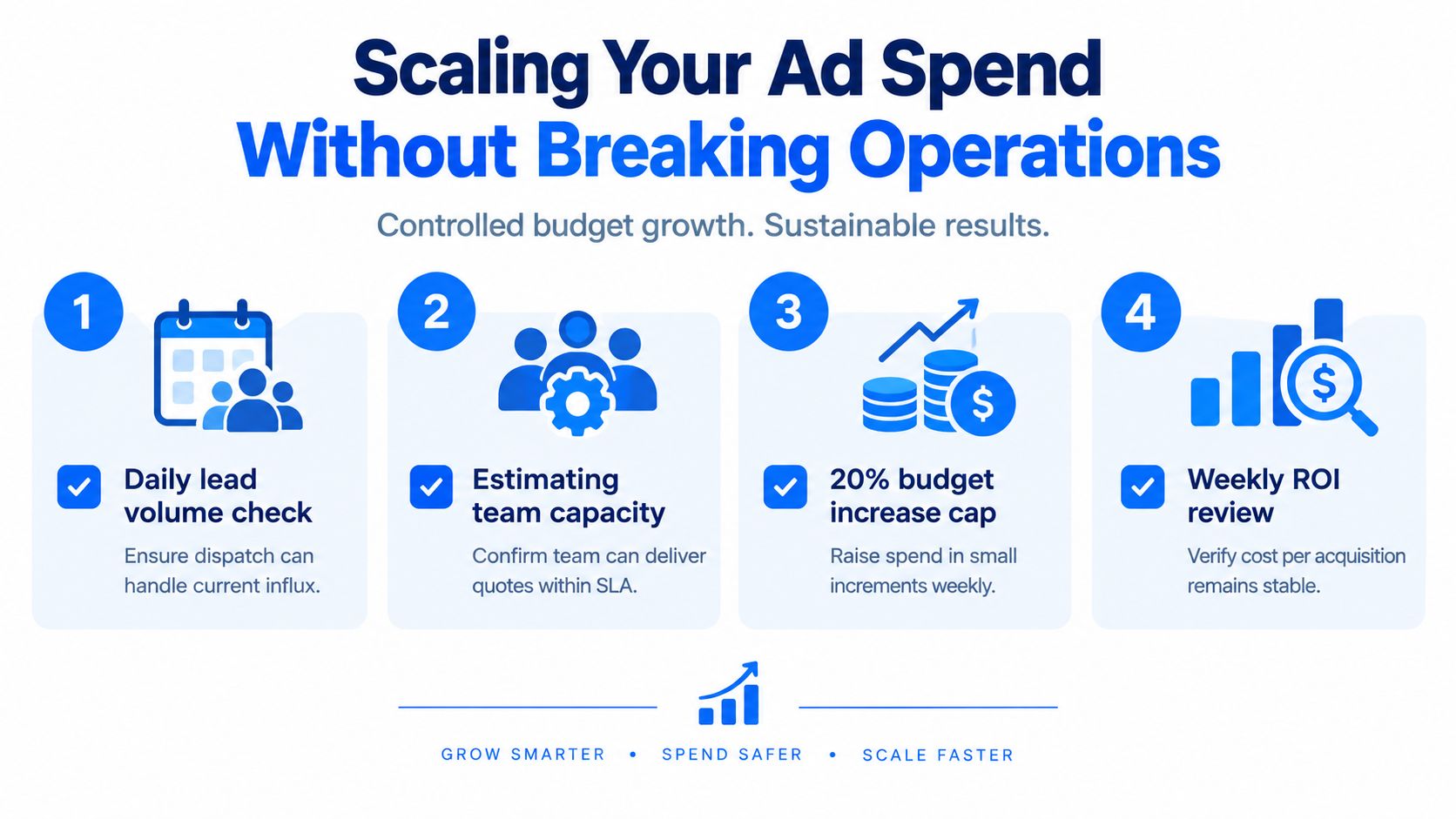
Use a controlled sequence:
- Check daily lead volume: Confirm dispatch can answer and route the current flow.
- Confirm estimating capacity: Make sure the team can deliver quotes within the promised service level.
- Review service-area quality: Expand only into locations the crew can serve profitably.
- Increase cautiously: Raise spend in small, approved increments rather than making a sudden account-wide change.
- Review weekly economics: Compare verified leads, booked estimates, closed revenue, and profit after ad spend.
- Pause when operations fail: A campaign that generates unanswered calls needs a workflow fix before more budget.
Wallet-based billing and approval workflows can help owners keep financial control without handing the entire account to an opaque monthly retainer. The important safeguard is explicit approval. Ads, creatives, targeting, and budget changes should remain paused until someone accountable for the business has reviewed them.
Add capacity before adding geography
Before expanding into another service area or trade, confirm that the new campaign has its own landing page, qualification rules, call routing, service-area exclusions, and reporting segment. A roofing campaign shouldn't share the same assumptions as an electrical-repair campaign, even if both target homeowners.
Use AI assistants to surface anomalies, summarize daily performance, and prepare proposed changes, but keep the approval step with the owner or marketing operator. Automation should remove repetitive monitoring, not remove accountability for spend or customer experience.
The practical order is simple: fix intake, validate qualified demand, verify booking capacity, then increase spend. Advertising for contractors becomes safer and more profitable when the business can absorb every additional lead it pays to create.
BenjiAds provides automated ad creative, campaign setup, hosted lead funnels, server-side and client-side tracking, and SMS-based follow-up for local service businesses, with campaigns kept paused until approval. Visit benjiads to see how you can connect contractor advertising with faster lead response and revenue-focused reporting.
- advertising for contractors
- contractor lead generation
- home service marketing
- speed to lead
- local service ads
Done for you
Ads that text you customers.
- ✓ Ads created for you
- ✓ Every lead texts your phone
- ✓ Free to use, no credit card
748+ local businesses run ads with benjiads