ppc software for small business 13 min read
PPC Software for Small Business: A 2026 Buyer's Guide
Compare the best PPC software for small business in 2026. See evaluation criteria, pricing models, and picks for local service companies.
On this page
- The Lead That Paid $47 and Disappeared
- What PPC Software Actually Does in 2026
- Six Criteria That Separate Real PPC Software from a Dashboard
- Four Platform Types and How They Actually Stack Up
- What the Right Stack Looks Like for Three Local Trades
- Pricing Models and Where Each One Actually Hurts
- Which PPC Software to Choose and When
- Questions Small Business Owners Ask Before Signing Up
You're probably staring at a live Google Ads account, a few leads are trickling in, and every month still feels like a guessing game. One missed call at night, one bad keyword, one form that never gets answered, and the budget you thought was buying jobs turns into noise. That's why ppc software for small business can't just manage clicks, it has to turn paid intent into booked work.
DIY ad tools
- Best fit
- Owners with marketing staff
- What it does well
- Campaign control, bidding, edits
- Where it breaks
- No built-in lead handling
Agencies
- Best fit
- Owners who want hands-off execution
- What it does well
- Strategy and account management
- Where it breaks
- Retainers can outgrow small budgets
Trade-specific software
- Best fit
- Local contractors and service firms
- What it does well
- Ads, lead routing, follow-up
- Where it breaks
- Narrower by design
All-in-one automation
- Best fit
- Multi-location teams
- What it does well
- Rules, reporting, scale
- Where it breaks
- Often stops at dashboards
If you've ever wanted a practical reference point for the broader tool market, browse AI support resources can be useful when you're trying to separate tool features from marketing fluff. For context on response speed, I also point owners to this speed-to-lead breakdown because the loss usually starts after the click, not before it.
The Lead That Paid $47 and Disappeared
A plumber buys a click on a Saturday night. The lead lands in voicemail at 9:47 PM, nobody answers, and by morning three competitors have already texted the homeowner. That's not a media problem, it's an operations problem, and most tools never touch it.
The old way of thinking starts with CPC, then drifts into vanity dashboards. The better way starts with one question, did the paid inquiry become a booked job, or did it die in the gap between ad click and human response?
That's the standard I'd use for every platform. If the software can't help you answer fast, route the lead cleanly, and keep the conversation moving until a job is booked, it's decoration with a login.
For a compact overview of adjacent tools, PPC software options from Keywordme are worth skimming, but keep your buyer hat on. A tool can look polished and still fail the one test that matters, whether it protects lead value when you're busy, closed, or on a roof.
Practical rule: if a paid lead can sit untouched for hours, your PPC stack is incomplete.
What PPC Software Actually Does in 2026
PPC didn't start as software for dashboards. It grew out of keyword auctions, first with GoTo.com in February 1998, then with Google's move from AdWords' old impression model to keyword auctions in 2002 through AdWords Select, which made the click the unit that mattered in practice (Pay-per-click history). That history still matters because modern software is supposed to manage the auction, not just report on it.
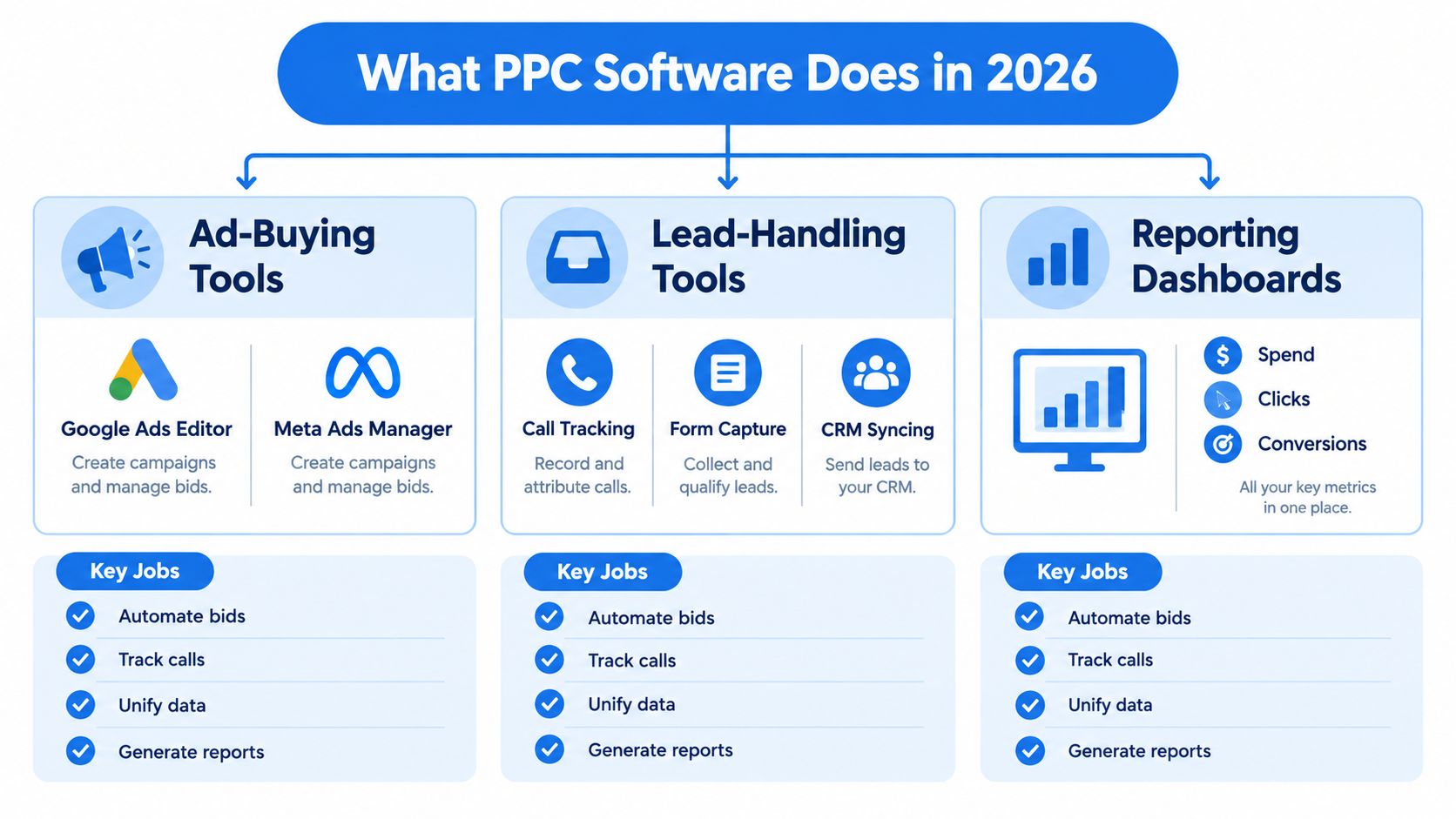
The stack has three jobs
Ad-buying tools build campaigns, write ads, and help manage bids. That's where Google Ads Editor, Meta Ads Manager, and similar tools live.
Lead-handling tools catch the inquiry, route it to someone reachable, and keep the conversation alive. That includes call tracking, form capture, SMS follow-up, and CRM sync.
Reporting dashboards show spend, clicks, and conversions in one place. Useful, yes, but only if the data is trustworthy and tied to actual business outcomes.
The mistake most small firms make is buying a dashboard and calling it software. If it doesn't also help you act on the lead, you still have to stitch the rest together by hand.
For a practical product comparison angle, this AI advertising platform overview is a useful way to think about how automation should behave when a human still needs to approve the final move. The point is simple, software should reduce manual work across the whole path from keyword to booked job, not just automate bids.
Six Criteria That Separate Real PPC Software from a Dashboard
A small business should score every PPC platform on six things, and not one of them is “looks modern.” If a vendor can't answer these, it's a dashboard with a sales pitch.
The rubric that actually matters
| Criterion | What it must answer | Failure mode if missing |
|---|---|---|
| Creative and campaign automation | Can it build the ads and structure fast? | You still pay someone to assemble everything |
| Lead-delivery channel | Does the lead reach a human instantly? | Leads sit in inboxes or get missed |
| Conversion-tracking integrity | Are conversions real, deduped, and traceable? | You optimize on fake or broken data |
| Follow-up sequences | Does it chase unanswered leads automatically? | After-hours inquiries go cold |
| Reporting clarity | Can an owner read it without decoding jargon? | Nobody knows what changed or why |
| Cost structure | Does the fee scale sensibly with spend? | Small budgets get crushed by overhead |
The tracking piece matters more than most owners admit. In a large Google Ads benchmark, 29% of accounts recorded zero conversions in a 90-day period, and accounts with at least one negative keyword averaged a 13% conversion rate versus 4.6% for accounts with none (WordStream benchmark). That tells you two things, tracking breaks often, and search-term hygiene still changes outcomes.
Direct advice: if a platform can't help you filter bad search terms and validate conversions, it's not a serious PPC system for a local business.
The cost structure also matters because your software shouldn't punish you for growing. A tool that charges only for activity you use is easier to live with than one that scales fees just because your campaigns perform better.
If you want a deeper look at how to audit the measurement layer itself, this ad tracking software guide is the right companion piece. I'd use that checklist before I'd trust any vendor's benchmark report.
Four Platform Types and How They Actually Stack Up
DIY ad tools
Google Ads Editor and Meta Ads Manager are solid if you've got someone in-house who knows how to build campaigns and watch them daily. They're good at control, speed, and bulk changes.
Their weakness shows up the moment the phone rings and nobody knows where the lead went. DIY tools don't solve response-time operations, and they don't magically tell you whether a booked job came from the ad or from a lucky call-back.
Verdict: they satisfy campaign control, ignore follow-up.
Agencies
A good agency can buy you time, which is why owners with no marketing skill often start there. You get setup, monitoring, and somebody else absorbing the learning curve.
The problem is that percentage-based management can start feeling expensive fast, especially when you're a contractor trying to keep overhead lean. Agencies also vary wildly in how tightly they tie leads to booked work, and plenty stop at CPL.
Verdict: they satisfy execution, often ignore ownership of the workflow.
Trade-specific software
This is the category where BenjiAds sits, software built to create ads, launch funnels, route leads by text, and keep owner approval in the loop. The point isn't abstract automation, it's reducing the distance between ad spend and a reachable lead.
That matters for a local business because the software is built around the exact gap that kills paid traffic, late-night inquiries and delayed responses. It's narrower than a general platform, but that's the advantage.
Verdict: it satisfies lead handling and fast follow-up.
All-in-one automation platforms
Tools like Adzooma and other automation suites are strong when you want rules, alerts, and broad oversight across campaigns. They're especially useful when the account is big enough that routine optimization becomes repetitive.
The tradeoff is that many of them still end at the dashboard layer. They can surface opportunities, but they don't always own the handoff from click to conversation.
Verdict: they satisfy optimization, often ignore the inbox.
The real difference between an agency and software isn't who clicks the buttons, it's whether the system survives when nobody clicks anything for an hour.
What the Right Stack Looks Like for Three Local Trades
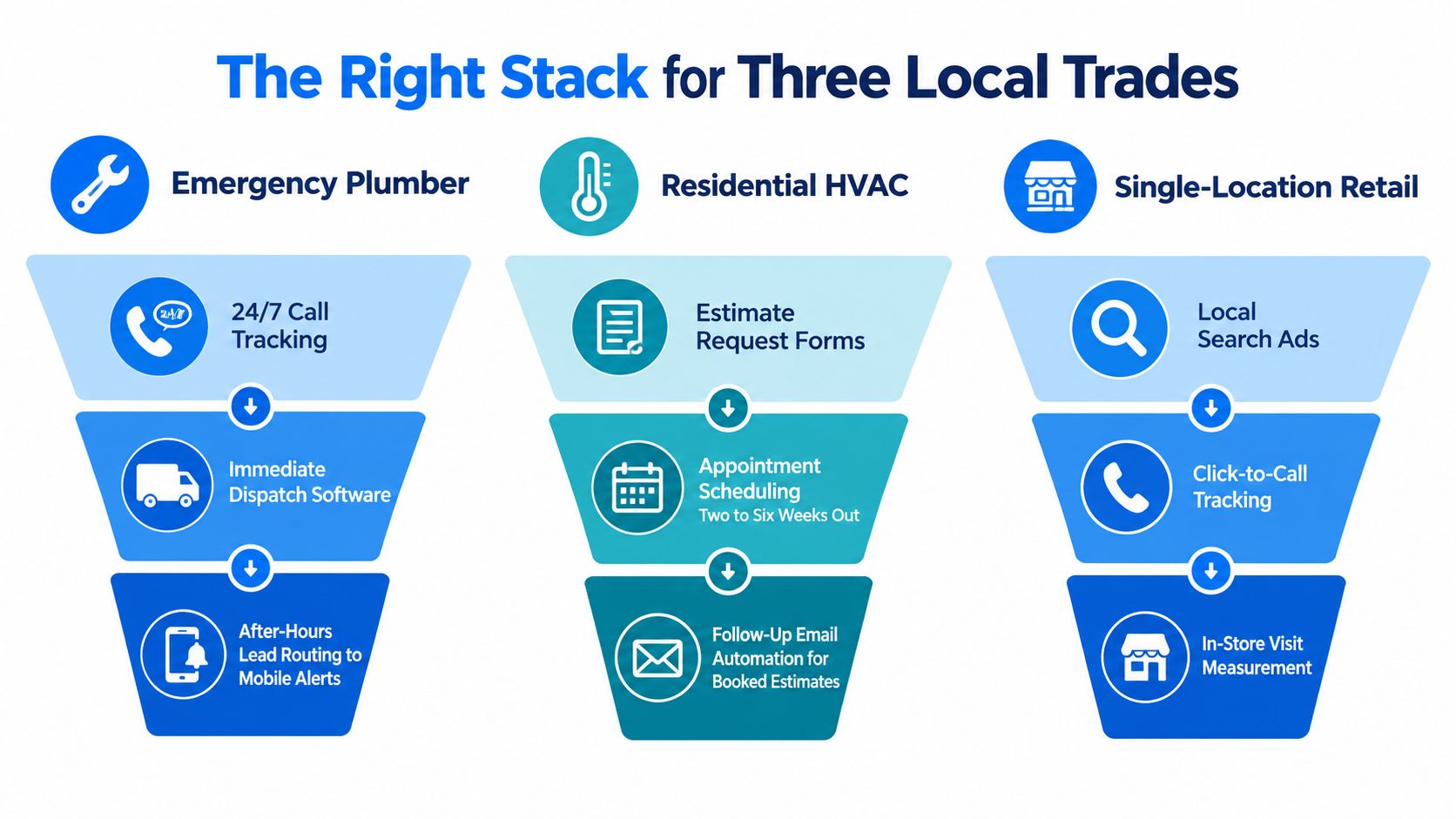
An emergency plumber needs a different stack than a dentist, because urgency changes the economics. A lead at midnight isn't “just another form,” it's the start of a rescue job, and speed matters more than fancy reporting.
Emergency plumber
Run tight search campaigns around urgent intent, then send calls and texts to a live mobile number, not a generic inbox. The follow-up should be immediate SMS acknowledgement, then a human callback if the lead doesn't answer.
Monday morning reporting should show calls answered, missed calls, booked jobs, and which keywords produced true emergencies. If the number looks good but nobody booked, the stack is lying to you.
Residential HVAC
This business wins when it captures estimate requests cleanly and keeps them warm over a longer buying cycle. Campaigns should push to appointment-focused landing pages, with reminders that keep prospects moving toward a scheduled visit.
The dashboard should emphasize booked estimates, not just raw form fills. HVAC owners need to know which ads fill the calendar, because a lead that never gets a time slot doesn't pay the bill.
Single-location dental practice
Dental search traffic is usually high intent and highly local, so the stack should favor tight geo targeting, click-to-call, and clear front-desk routing. If a form comes in after hours, an automated confirmation helps, but the office still needs a next-business-day callback path.
What belongs on the owner's dashboard is simple, source, contact rate, booked appointment, and which landing page is producing real patients. Anything else is noise.
BenjiAds fits the contractor use case better than the others because it keeps ads, landing pages, tracking, and SMS follow-up in one workflow. That isn't the right answer for every business, but for a local service operator living on phone calls and appointments, it's the cleanest operational fit.
Pricing Models and Where Each One Actually Hurts
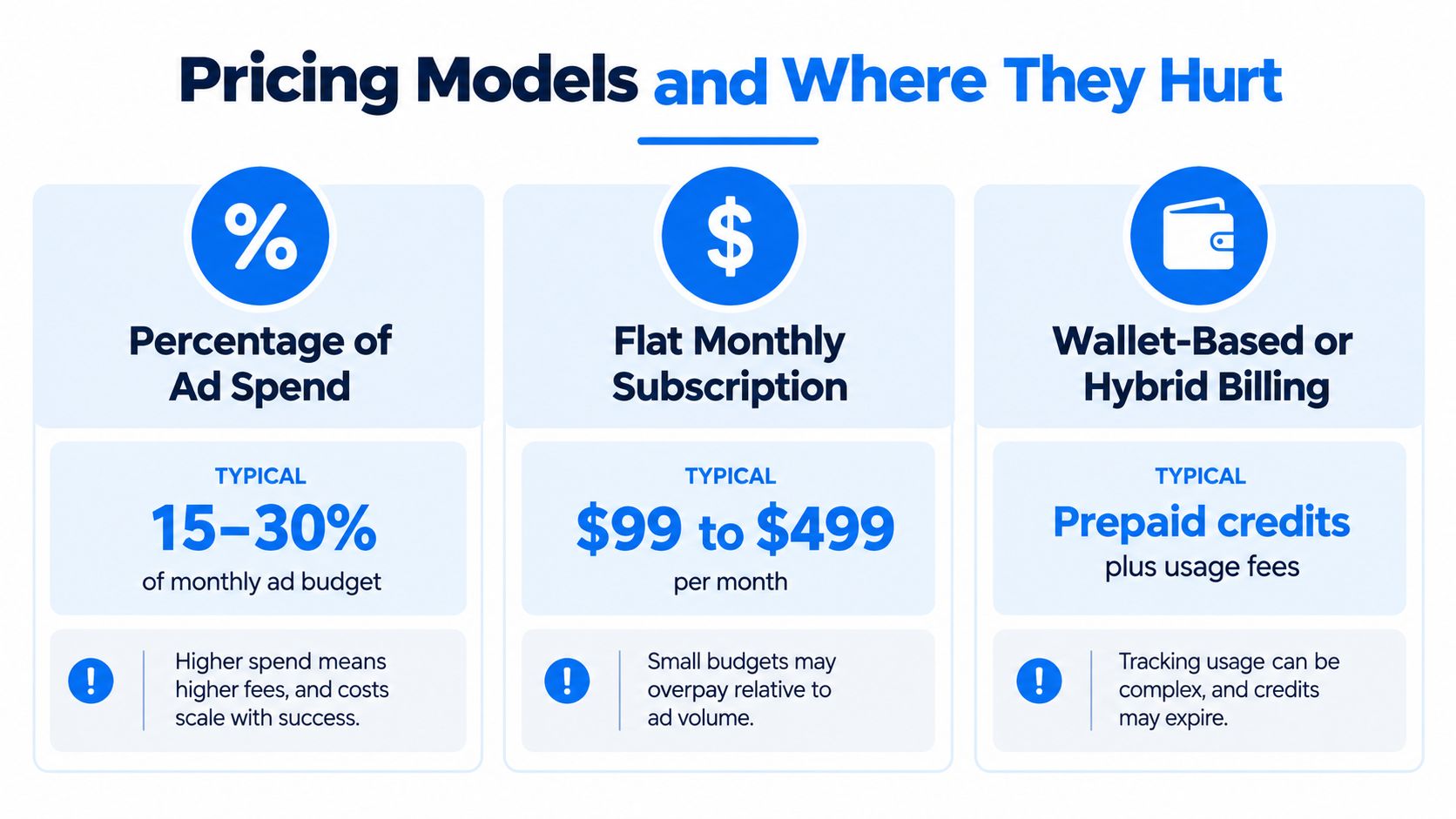
Pricing gets messy because vendors rarely separate what you are paying for. Strip away the packaging and the usual options are simple, percentage of spend, flat monthly fee, or a hybrid wallet-style model.
Percentage fees
These show up a lot in agency work. They tie the provider's revenue to media spend, which sounds fair until your costs rise just because you are scaling.
That model makes sense if you want human labor and do not want to manage software yourself. It fits poorly if you want a lean operating system that does not get pricier every time the account performs.
Flat subscriptions
A monthly subscription is easy to budget for. That is the main appeal.
The downside is obvious. If your spend is low or seasonal, a fixed fee can sit too close to the media itself. This model works best when volume is predictable and you want the same toolset every month. It is a weaker fit if you are still testing channels or running a stop-start business.
Hybrid wallet billing
Hybrid billing ties cost to usage more directly, which is why it often feels fairer for local contractors. BenjiAds pricing uses a flat 20% management fee on ad spend and no subscription, so the link between media spend and platform cost stays clear.
That structure will not fit everyone, but it does make it easier to judge whether the fee is buying outcomes or just software access. BenjiAds reports around $7 per phone-verified lead across local campaigns. For broader context, the WordStream 2026 benchmark reports $66.69 cost per lead across 13,474 U.S. search campaigns. Those numbers are not the same thing, and neither one tells you what a booked job costs.
Decision rule: if you are small and hands-on, avoid pricing that grows faster than your spend. If you are scaling and hate admin, pay for simplicity only when it still protects lead quality.
Video
Which PPC Software to Choose and When
If you've got an in-house marketer, use DIY tools. You keep control, you learn faster, and you don't pay a markup for someone else to click through your account. That choice only works if someone on your side can spend time inside the platform every week.
If you want to hand everything off, an agency can still be the right move. Just be honest that you're paying for labor, not software, and make sure they report on booked work, not just lead count.
If you run multiple locations or a larger budget, an automation platform starts making more sense because the repetitive work grows with the account. The more campaigns you have, the more useful rules, alerts, and bulk edits become.
For solo local-service operators who want software-grade execution without a traditional retainter model, BenjiAds is the one I'd put on the shortlist. It combines ad creation, landing funnels, phone verification, SMS-delivered leads, and approval-based control, which means the owner still decides what goes live while the software does the heavy lifting.
Ask one blunt question before you buy anything, would you still want it if it couldn't text the lead within sixty seconds?
Questions Small Business Owners Ask Before Signing Up
A lot of owners ask the wrong first question, usually some version of “How much does it cost?” The better question is whether the software can reconcile the numbers you already trust, your CRM, your phone log, and your ad account.
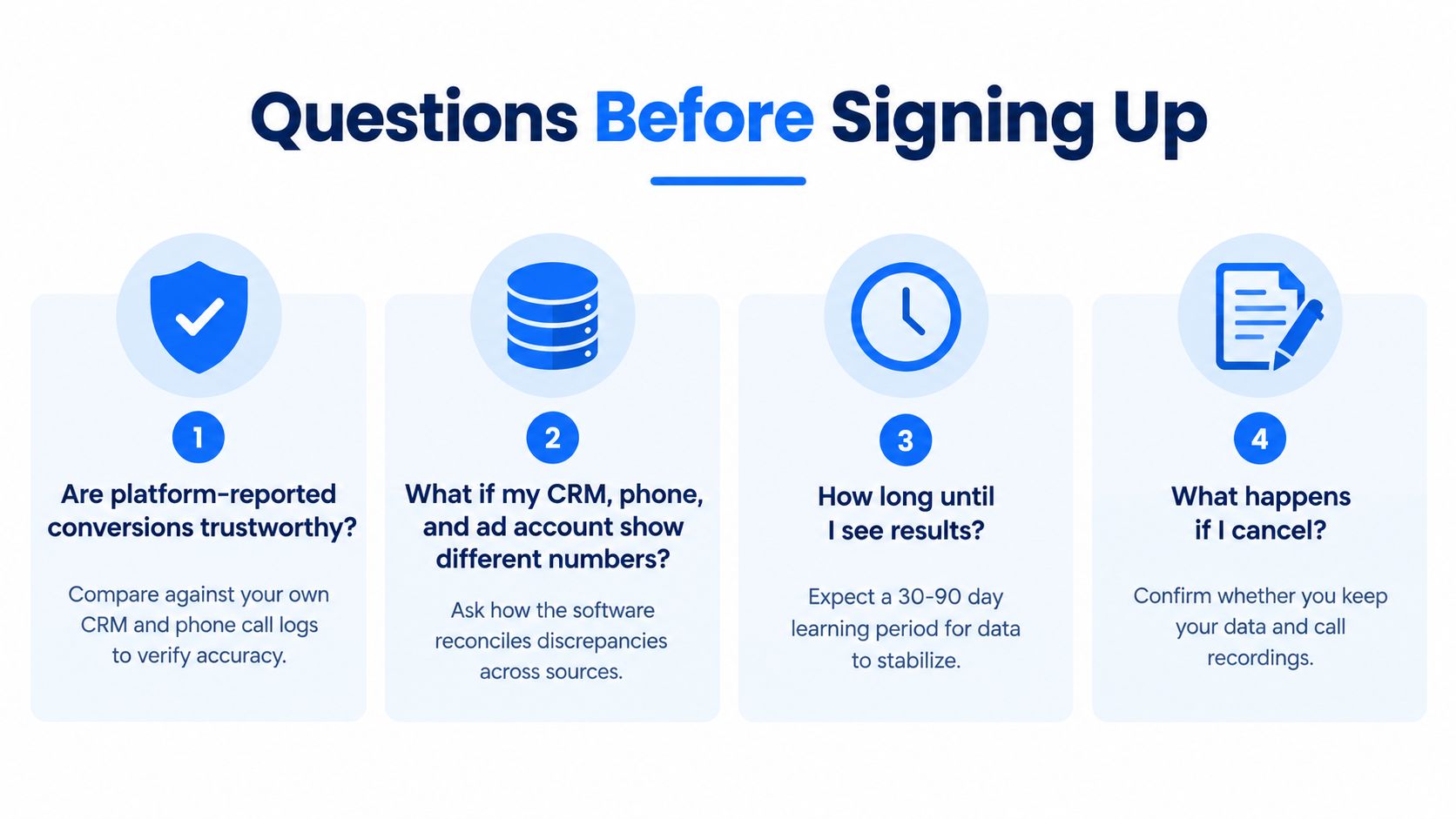
What if my numbers don't match
Assume they won't, at least at first. Platform conversions, CRM entries, and actual revenue rarely line up perfectly because of duplicate leads, delayed follow-up, call tracking gaps, and attribution rules that differ across systems.
Use the CRM or verified contact record as the operational truth, then let platform data guide optimization. If the software can't explain the gap, it's hiding a measurement problem instead of fixing one.
How should after-hours leads be handled
The answer is fast acknowledgement, clear next steps, and a human follow-up path the next morning. The business reality is that a meaningful share of local leads arrive after hours, so the system has to preserve intent when nobody's in the office.
Consent still matters, so the follow-up flow should be built around opt-in and proper messaging practices, not spammy blasts. If the lead can't be answered immediately, the software should at least keep the thread warm.
How much AI control should I allow
Let the software read results and prepare changes, but keep final approval human when budget or messaging shifts are involved. AI is useful for pattern recognition and routine adjustments, but it shouldn't be allowed to rewrite your business rules without oversight.
The right boundary is simple, automation can suggest, prepare, and pause, but the owner should approve what changes spend or customer promises.
What should the first 30 days look like
Expect setup, data cleanup, and basic learning. The first month should tell you whether leads are reaching the right phone, whether conversions are being recorded, and whether the follow-up path is working.
If the platform can show real contact rates, booked appointments, and clean source data, you're on the right track. If it only shows cheaper clicks, it's not doing enough.
BenjiAds gives local service businesses a way to run ads, land leads, and follow up by text without stitching together five tools and a freelancer. If you want a system built around booked jobs, not dashboard theater, visit benjiads and look at how it handles campaign setup, lead routing, and approval-based control.
- ppc software for small business
- small business ppc
- local service ads
- ppc automation
- ppc pricing
Done for you
Ads that text you customers.
- ✓ Ads created for you
- ✓ Every lead texts your phone
- ✓ Free to use, no credit card
748+ local businesses run ads with benjiads