tag someone 11 min read
How to Tag Someone: A Social Media Guide for 2026
Learn how to tag someone on Facebook, Instagram, and X with this concise guide. Get step-by-step instructions and tips for 2026.
On this page
You're probably here because you've got a post half-finished, the photo is loaded, and now you're wondering whether to tag the customer, the coworker, the venue, or the brand partner. That's the moment where you either overdo it or skip it entirely.
Tagging isn't hard, but doing it well takes more than knowing where the button lives. The key difference is understanding what kind of connection you're creating, who gets notified, and whether you need a visible tag on the content itself or just an @mention in the caption or comments.
Understanding the Basics of Social Tagging
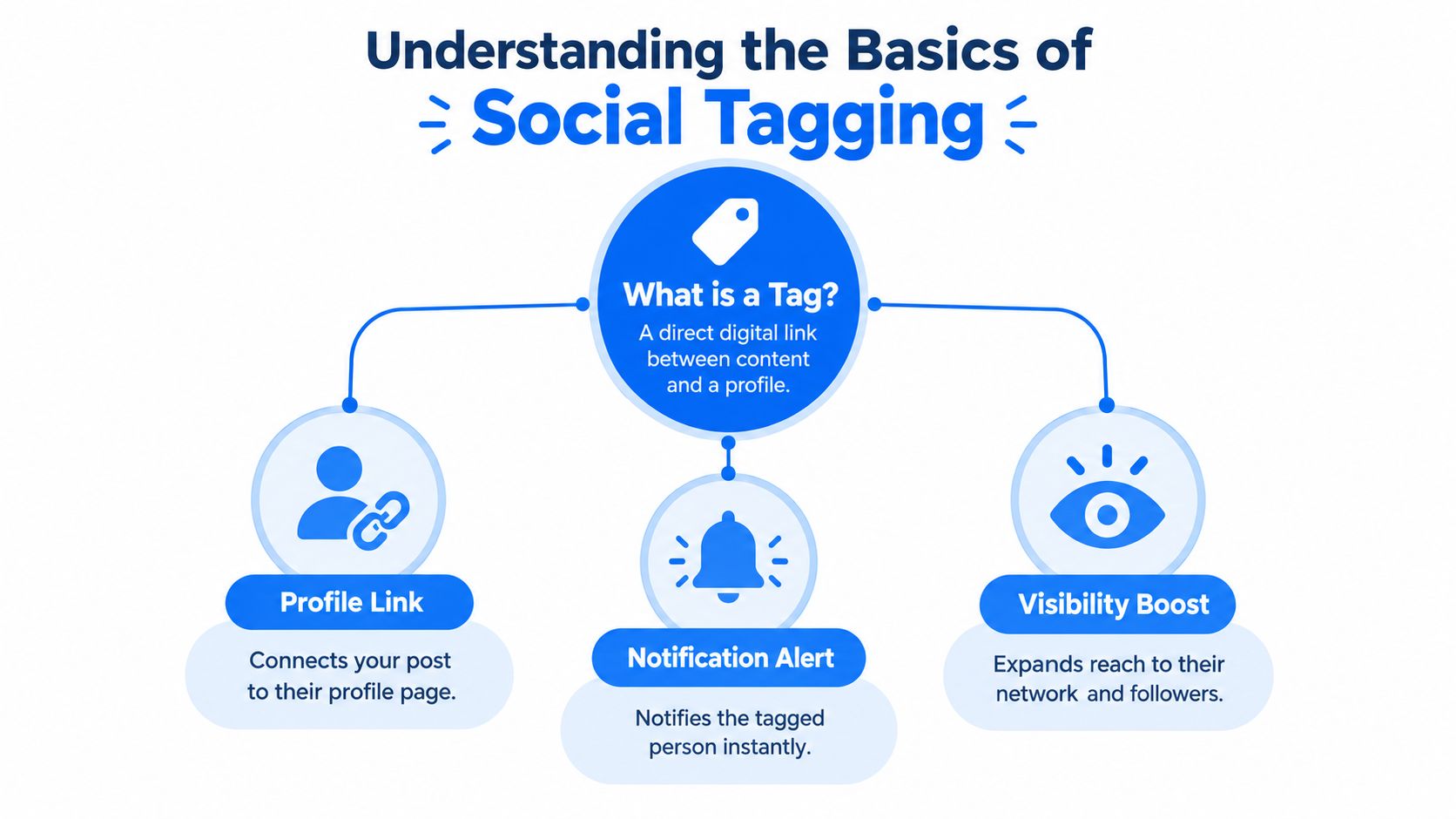
A tag is more than typed text. It creates a direct link between your content and someone's profile, and on most platforms it also sends them a prominent notification. That's why tagging feels stronger than just writing a name in a caption.
If you're learning how to tag someone, start with this distinction:
| Action | What it does | Best use |
|---|---|---|
| Visible tag | Links the person directly to the post, image, or media placement | Credit, identification, collaboration |
| @mention in text | Notifies them inside the written caption, post, or comment | Conversation, shoutout, follow-up |
| Plain text name | Says their name without creating a clickable link | When you don't want to notify them |
The part many tutorials miss is the social weight of a tag. You're not just labeling content. You're asking for attention, borrowing association with that person or business, and in some cases making the relationship visible to other viewers.
What changes by platform
Facebook, Instagram, and text-heavy platforms don't all treat tags the same way.
- Facebook gives you a real split between tagging someone in the post text and tagging them on a photo.
- Instagram leans visual. A tag often sits directly on the image, while a Story uses a sticker-style mention.
- X and Threads rely more heavily on @mentions in text, though X also supports photo tagging.
Practical rule: If the person should be visibly attached to the image or asset, use a tag. If you only need to bring them into the conversation, use an @mention.
This matters for small businesses more than people think. A contractor posting a finished remodel, a photographer crediting a venue, or a dentist thanking a partner office all need to choose the right type of connection. The same judgment applies when you're trying to generate engagement around local service content such as home service leads.
How to Tag Someone on Facebook
Facebook still has one of the more useful tagging systems, but it's also where people most often choose the wrong option. The key is knowing whether you want the tag attached to the image itself or only inside the post context.

Tagging someone in a Facebook post
If you're posting from the main composer:
- Create a new Facebook post.
- Add your text, photo, or both.
- Look for Tag People in the posting options.
- Start typing the person's name.
- Select the correct profile from the suggestions.
- Publish the post.
This method keeps the tag tied to the update. It's the right move when you're thanking a collaborator, referencing a customer with permission, or notifying a coworker about the post.
Tagging someone on a Facebook photo
Photo tagging is more visual and more public in feel.
- Upload the photo.
- Open the image preview.
- Click or tap Tag Photo or Tag People.
- Tap the face or area in the photo where the person appears.
- Enter their name and confirm.
- Save, then publish.
This creates a visible association on the image itself. Use it when the person is in the photo or directly connected to what the image shows.
If the person isn't pictured, don't use a photo tag just to get their attention. That's where a post mention works better and feels less spammy.
When Facebook tags fail
If Facebook won't show the right person, the problem is usually one of these:
- Privacy settings. The other person may limit who can tag or mention them.
- Audience mismatch. Some tags don't appear cleanly if your audience settings are narrow or highly restricted.
- Page versus profile confusion. You may be trying to tag a personal profile from a Page workflow, or the reverse.
- App glitches. Facebook's mobile app sometimes hides tag options until you restart the composer.
A quick visual walkthrough helps if the menu wording has shifted in your app version:
Tagging Strategies for Instagram Posts and Stories
Instagram makes tagging feel simple, but there are really two different workflows: tags on feed posts and tags inside Stories. They look similar from the viewer's side, but they behave differently while you're creating them.
A HubSpot and Mention report found that around 40% of posts contained no tagged users, while a later version of the same research reported 34.4% of posts with no tagged users, which means most Instagram posts include at least one tag in practice. The same report also noted that posts with at least one hashtag received 12.6% more engagement than those without, and posts using 11 or more hashtags could receive 79.5% more engagement on average across major markets, showing how tag-based discovery systems shape visibility on Instagram and related platforms in practice (HubSpot and Mention Instagram research).
How to tag someone on an Instagram post
For a standard photo or carousel:
- Upload the image or carousel.
- Move through filters and edits.
- On the final details screen, tap Tag People.
- Tap Add Tag or tap directly on the image.
- Search for the username.
- Select the correct account.
- Reposition the tag if needed, then share the post.
Two things trip people up here. First, the tag placement can be moved after you add it. Second, on a carousel you need to make sure you're tagging on the correct slide, not just the first image.
How Stories work differently
Stories use a more obvious mention flow.
- Tap the sticker icon at the top of the Story editor.
- Choose the @ mention sticker.
- Type the username.
- Resize and place the sticker where you want it.
- Publish the Story.
You can also type “@username” as text in some versions, but the sticker is usually more reliable and more readable. If you've ever wondered why one Story mention looks tappable and another looks like plain text, that's usually the difference.
The cleanest Instagram credit is often one visible tag on the image plus one natural @mention in the caption, not a pile of usernames stacked together.
For visual businesses, this matters a lot. A photographer, venue, florist, or event planner often needs to credit multiple collaborators without turning the post into clutter. If that's your world, thoughtful tagging supports the same relationship-building you'd want in broader photography marketing.
What works and what doesn't
Here's the practical version:
- Works well. Tagging the featured person, brand, venue, or collaborator directly tied to the content.
- Usually weak. Tagging unrelated large accounts in hopes they'll notice.
- Easy to mess up. Hiding tags in a crowded corner of a Story where viewers can't read them.
- Often smarter. Using one image tag and keeping extra context in the caption.
Navigating Tags on X and Threads
X and Threads are where people blur tagging and mentioning the most. On these platforms, an @username inside the text is usually the main action people mean when they say “tag.”
That's fine most of the time. But there's still a real functional difference between a mention in text and a tag attached to media.
Mentions in text
If you type @username in a post or reply, you create a clickable mention and the person gets notified. This is the normal choice when you're replying, referencing someone's point, or inviting them into the conversation.
Threads works largely this way in everyday use. It's text-first, conversational, and built around mentions more than visual tagging.
Photo tags on X
X also lets you tag people in photos. That's a separate action from typing @username in the tweet text.
Use a photo tag when the image is about that person. Use a text mention when you're talking to them or about them. If you do both, make sure there's a reason. Otherwise it feels like a double notification.
| Platform | Best default action | Use a stronger tag when |
|---|---|---|
| X | @mention in post text | The person is in the attached photo |
| Threads | @mention in post or reply | You need direct conversational visibility |
| Visual tag on media | The person or brand is central to the content |
A good rule on X and Threads is simple. If the post would still make sense without the person being visibly attached to the media, a mention is usually enough.
The Etiquette and Psychology of Tagging
The fastest way to annoy people on social media is to treat tags like free reach. They're not. They're a direct interruption.
A controlled study on public targeted sharing found that tagging triggered a direct notice, and at least one tagged person replied in the majority of cases, while all tagged people replied in 52% of cases (public targeted sharing research on arXiv). That lines up with what most social managers already know from experience. A tag is not passive. It asks for attention right now.

Why tags can lift engagement
A 2025 LinkedIn study that analyzed a random sample of 991 posts found that for every account tagged in a post, predicted reactions increased by a factor of 1.15, and tags also substantially increased comments. The same study found that tags and hashtags both increased expected reactions, but tags had the strongest effect (LinkedIn tagging study in Social Media and Society).
That doesn't mean you should tag everyone. It means tags work because they create relevance and draw in the right participants.
The etiquette most guides skip
People respond well to tags when the post clearly answers one of these questions:
- Are they featured? They appear in the photo, video, event, or result.
- Did they contribute? They helped create, approve, host, or support the content.
- Would they reasonably reply? The tag invites a real response, not a forced one.
- Would an outsider understand the connection? If not, the tag feels random.
IBM research on enterprise and social-tagging systems found that a roughly 70:30 ratio of original to duplicate tags was a reasonable balance for maintaining originality and validity (IBM tagging research). In plain English, that supports a simple habit: tag the main person or account first, then add only a small number of clearly related secondary tags.
A good tag feels like credit or coordination. A bad tag feels like bait.
For local businesses, this is especially important when approvals, testimonials, partner shoutouts, or before-and-after posts involve clients and vendors. The judgment you use for tags is the same judgment you need in healthcare and professional niches where reputation matters, including social media for dentists.
Troubleshooting Common Tagging Issues
Sometimes the tag button is there and still nothing works. Other times the button vanishes completely. Usually the problem comes down to permissions, post format, or platform limitations after publishing.
If you can't tag someone
Run through these checks:
- Confirm the account exists in search. Typos, display-name changes, and duplicate profiles cause more misses than people think.
- Check whether you're tagging a person or a business page. Some workflows surface one more easily than the other.
- Look at privacy restrictions. Some people limit who can tag or mention them, especially on Facebook and LinkedIn.
- Try the native app. Third-party schedulers often have weaker tagging support than the platform itself.
An especially common gap in current guidance is the mess that happens after a post is live. Recent platform how-to coverage notes that some platforms allow post-publication tag edits while others push you toward comments or @mentions instead, and many guides still don't explain edge cases like missing tag options, friend-list restrictions, carousels, Stories, or cross-posted content very well (SocialRails guide on mentions, tags, and post-edit edge cases).
Editing and removing tags after posting
Use the least disruptive fix.
- On Instagram or Facebook, open the post, tap the three-dot menu, choose Edit, and look for the tag controls.
- If the visual tag can't be changed, add a clean @mention in the caption or comments instead.
- On X, if the issue is in the text, edit if available in your workflow. If the photo tag itself is wrong, reposting is often the cleaner option.
- If the tag option disappears entirely, duplicate the post draft or re-upload the asset. Some app versions fail to preserve tagging controls during edits.
Another frequent point of confusion is the difference between a visible tag and a plain-text mention. Existing platform coverage shows users often want that distinction spelled out because it changes how approvals, customer shoutouts, and collaborator credit should be handled across Meta and LinkedIn (Evergreen Feed explanation of tagging versus mentioning).
If you can't fix a visible tag cleanly, use a respectful mention in the caption and move on. That's better than forcing the wrong association onto the asset.
If you need more than posting advice, benjiads helps local businesses turn social traffic into real leads with automated ads, tracking, retargeting, and fast text follow-up. If you're trying to connect better content with better response after someone clicks, visit benjiads.
- tag someone
- social media guide
- Facebook tips
- Instagram tags
- online etiquette
Done for you
Ads that text you customers.
- ✓ Ads created for you
- ✓ Every lead texts your phone
- ✓ Free to use, no credit card
748+ local businesses run ads with benjiads