google my business page 13 min read
Google My Business Page: The Complete Local SEO Guide
Master your Google My Business page and boost local visibility. Learn key features, benefits, and optimization strategies for your local business today.
On this page
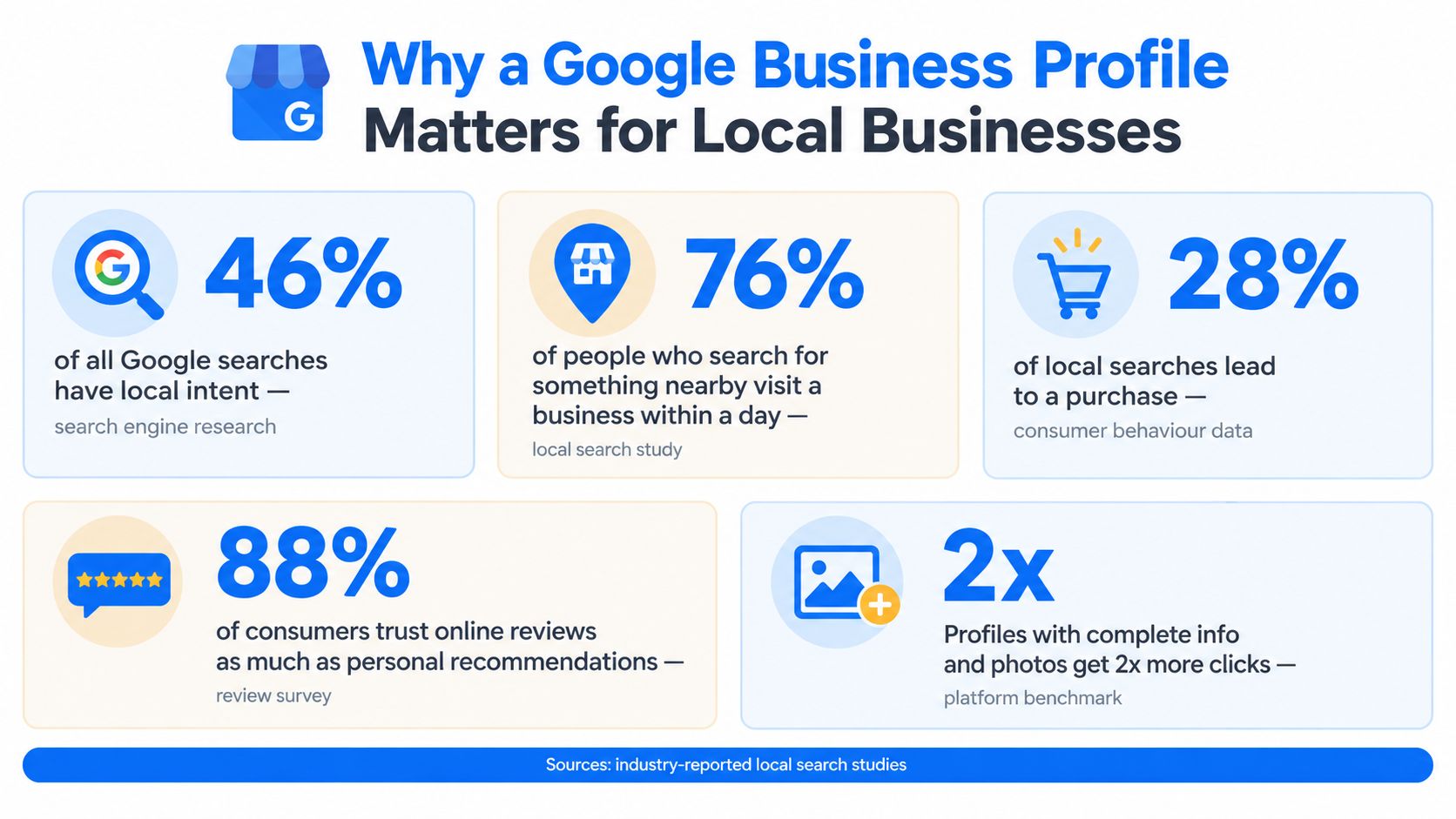
Google My Business is the former name of Google Business Profile, Google's free business-listing system for Search and Maps. Approximately 46% of Google searches have local intent, rising to about 56% on mobile, so a profile remains a primary way for local businesses to appear when nearby customers are looking for help.
You may still call it a Google My Business page because your software, a customer, or an older marketing guide uses that name. The important point is practical: the name changed, but the local presence still connects your business name, services, hours, reviews, photos, contact details, and location with the places where customers search.
A profile isn't a page you fill out once and forget. It works more like a live local-discovery asset. Google evaluates its relevance, distance, and prominence, while customers judge whether the information looks accurate, trustworthy, and easy to act on.
What Is a Google My Business Page
A Google My Business page is the former name for a Google Business Profile, the listing that represents a business in Google Search and Google Maps. A customer searching for an electrician, dentist, repair shop, or landscaper may see the profile before visiting the company website. From there, they can often call, request directions, visit the website, read reviews, or send a message.
The name creates confusion because Google has changed the product's branding several times. It began as Google Local Business Center in 2005, then moved through names including Google Local, Google Places, Google+ Local, and Google My Business. On November 4, 2021, Google announced the transition to Google Business Profile, primarily changing the name and management experience rather than replacing the underlying listing system. Search Engine Journal's explanation of the Google Business Profile transition provides the broader naming context.
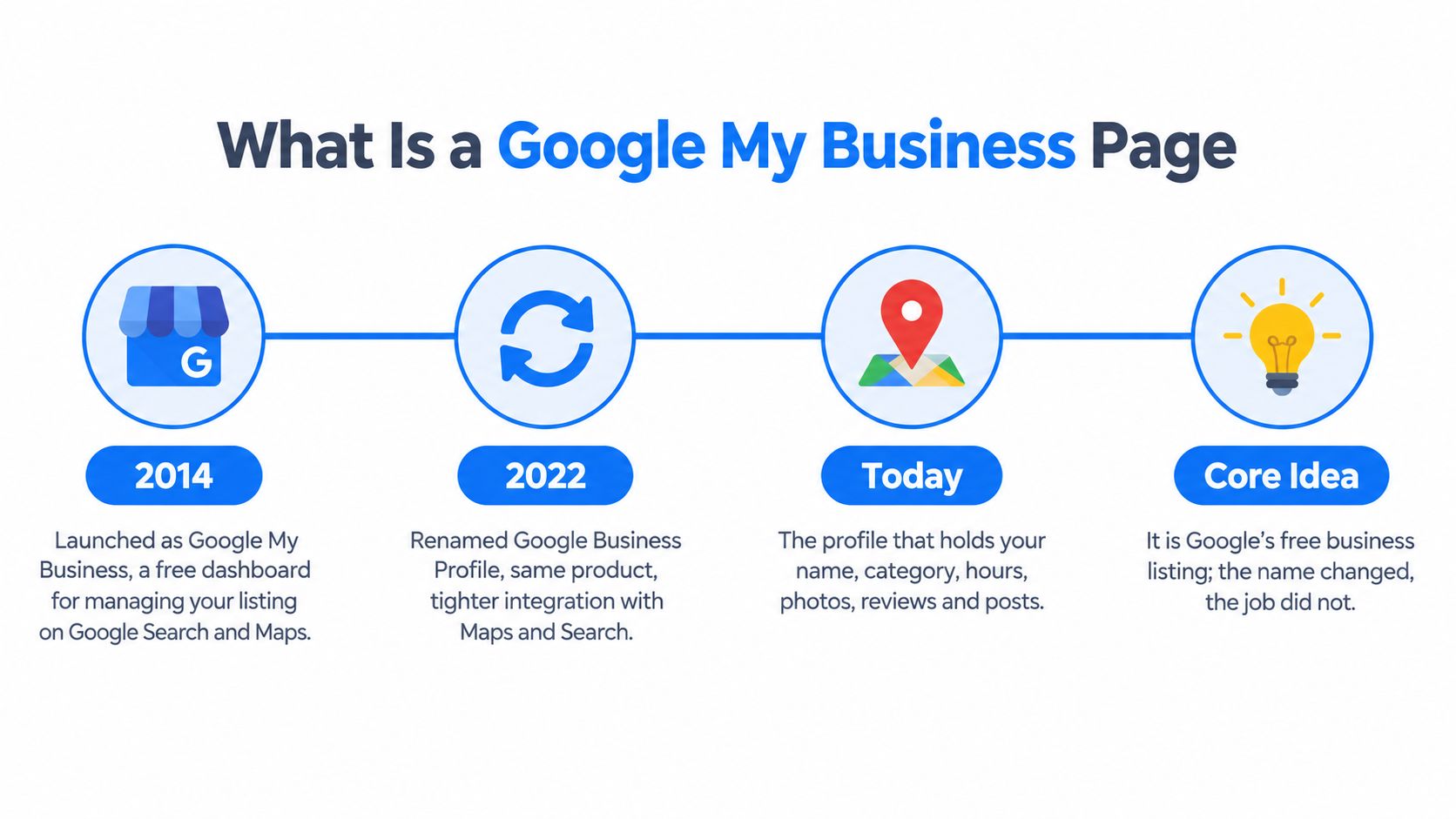
What changed for business owners
Suppose a plumbing company follows an older guide telling the owner to open the Google My Business dashboard. The owner may find that Google now expects a single-location business to manage the listing directly through Google Search or Google Maps. The profile, reviews, verification status, and business information remain associated with the same local presence, but the interface and terminology may look different.
Google shifted the former Google My Business website toward larger organizations managing multiple locations, and the dedicated mobile app was scheduled for retirement in 2022. That means an old instruction isn't necessarily wrong about the task, but it may be outdated about where the task happens.
The same naming issue appears in integrations and conversations. A call-tracking tool may still refer to a GMB listing. A customer may ask whether your “Google My Business page” is updated. A consultant may say GBP. In most practical situations, those phrases refer to the same core local listing.
Practical rule: Follow current Google Business Profile instructions, even when your team still uses “GMB” as shorthand.
Your profile also works alongside other local platforms. For example, businesses comparing their Google presence with location management on Facebook should keep the business name, address, phone details, and service information consistent wherever customers may discover them.
Why a Google Business Profile Matters for Local Businesses
A local customer rarely begins with a company name. They begin with a need and a location, such as “emergency plumber near me” or “dentist open today.” A Google Business Profile places your business information inside that decision moment, rather than asking the searcher to find your website first.
Industry estimates compiled in the available local SEO statistics summary report that approximately 46% of Google searches have local intent, with the proportion estimated at about 56% for mobile searches. The same compilation reports that 76% of people who conduct a local search on a smartphone visit a related business within 24 hours, and 28% of those visits result in a purchase. These figures are aggregated industry estimates, not official Google measurements or guaranteed outcomes for every profile.
The profile supports several customer actions
A directory listing gives someone information. A Business Profile can also give them a next step. Depending on the business and its settings, the searcher may:
- Call the business: Useful when a customer needs an answer before booking.
- Request directions: Important for storefronts, clinics, shops, and offices.
- Visit the website: A chance to explain services, qualifications, pricing approach, and availability.
- Send a message: Helpful for customers who aren't ready to call.
- Read reviews: A trust check before contacting an unfamiliar provider.
- Review hours and services: Often the difference between a relevant result and an ignored one.
That range of actions is why accuracy matters. A wrong phone number can waste high-intent demand. Incorrect hours can send a customer to a closed location. A vague service description can make Google and the searcher uncertain about whether the business handles the job.
Reviews add another layer. The same industry summary reports that 98% of consumers read online reviews for local businesses, while 88% trust online reviews as much as personal recommendations. Those figures should be treated as industry estimates rather than universal conversion guarantees, but they show why review visibility affects the customer journey. A profile with clear services and credible, recent customer feedback gives people more evidence to evaluate.
A complete profile won't overcome every disadvantage. A business may be farther from the searcher, less established, or poorly matched to the query. Still, accurate information, relevant services, and genuine reviews give the profile a better chance of competing when a customer is actively looking nearby.
How Google Ranks Local Listings
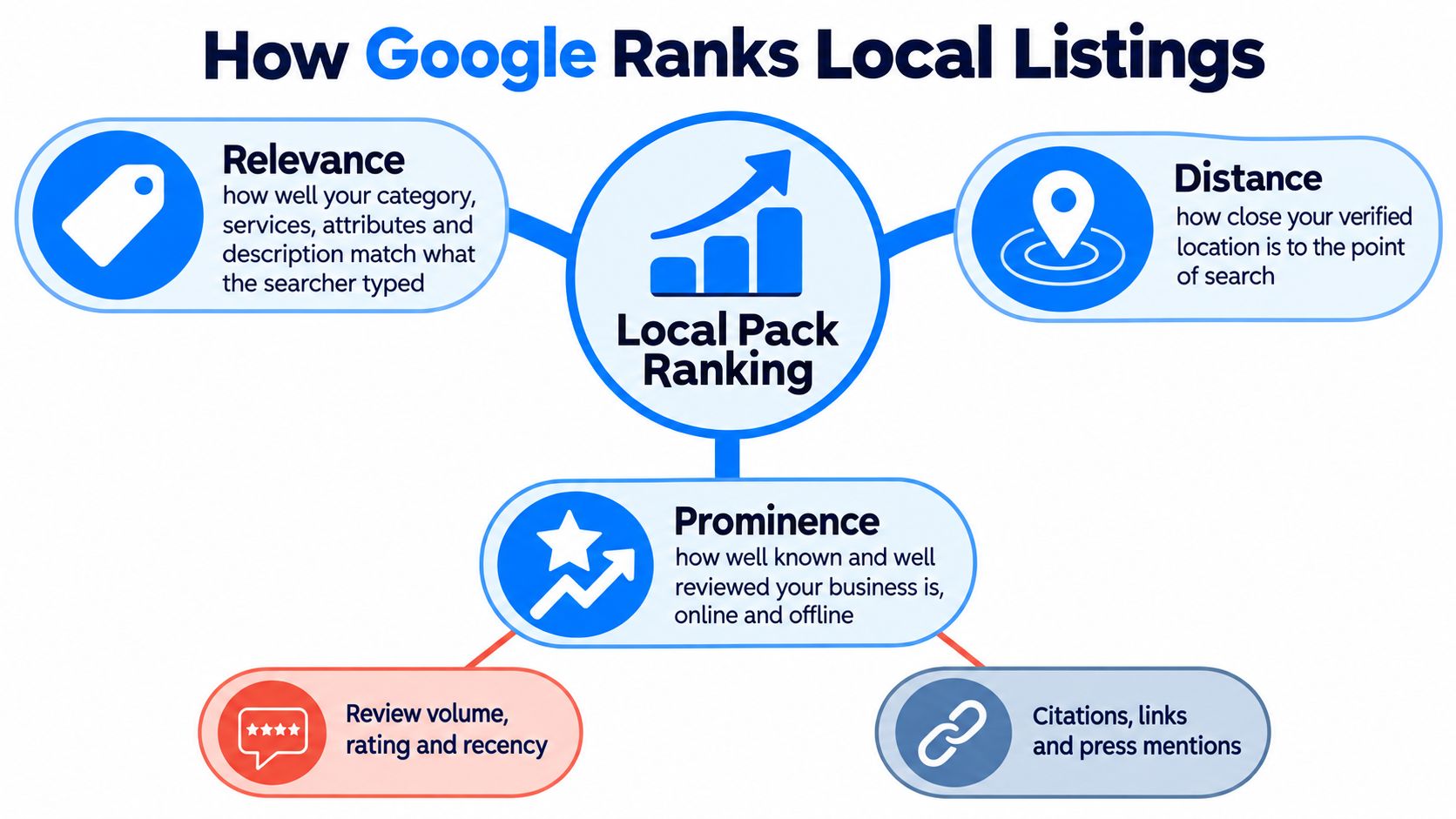
Google describes local visibility through three interacting variables: relevance, distance, and prominence. The three don't operate like a checklist where completing one guarantees a top position. They interact with the search query, the searcher's location, and the strength of competing businesses.
Relevance starts with accurate specificity
Relevance is the match between what the searcher wants and what your profile clearly describes. Google can use the primary category, services, business description, attributes, and other information to estimate whether your listing satisfies the query.
A general category such as “Contractor” may not communicate the same intent as a more accurate category supported by clearly defined electrical, plumbing, or remodeling services. The answer isn't to add every possible keyword. Keyword stuffing can make the profile less trustworthy and may misrepresent what the business does.
Write for the customer first. Describe the work you perform, the areas you serve, the situations you handle, and the factors that help someone choose you. Make sure the same service language appears naturally on the website and other authoritative business references.
Distance limits what optimization can change
Distance is calculated from the searcher or from the location term in the query. Two identical profiles can rank differently across neighborhoods because Google is answering a location-specific question.
A business can't directly optimize its way out of distance. A strong profile may appear for customers farther away in some searches, but no legitimate edit guarantees visibility in every surrounding area. Storefronts should publish an accurate customer-facing location. Service-area businesses should define the places they cover instead of publishing an address customers cannot visit.
Prominence grows through reputation
Prominence represents how well known and authoritative Google estimates the business to be online and offline. Google identifies review quantity, review sentiment, links, articles, directories, and broader web presence as inputs. Consistent business details across credible sources support that broader identity.
Many weak optimization programs fail at this stage. They edit the description repeatedly while ignoring reviews, outdated directory records, missing service information, or a website that describes a different business. Local SEO work should improve the full evidence base, not just the profile text.
A stronger prominence signal doesn't guarantee a fixed ranking. Local results remain query and location dependent.
For a practical extension of these principles, compare profile management with guidance on advertising a small business locally. Paid promotion can create additional visibility, but it doesn't replace accurate local information or a credible profile.
Reading Performance Data Like a Local Funnel
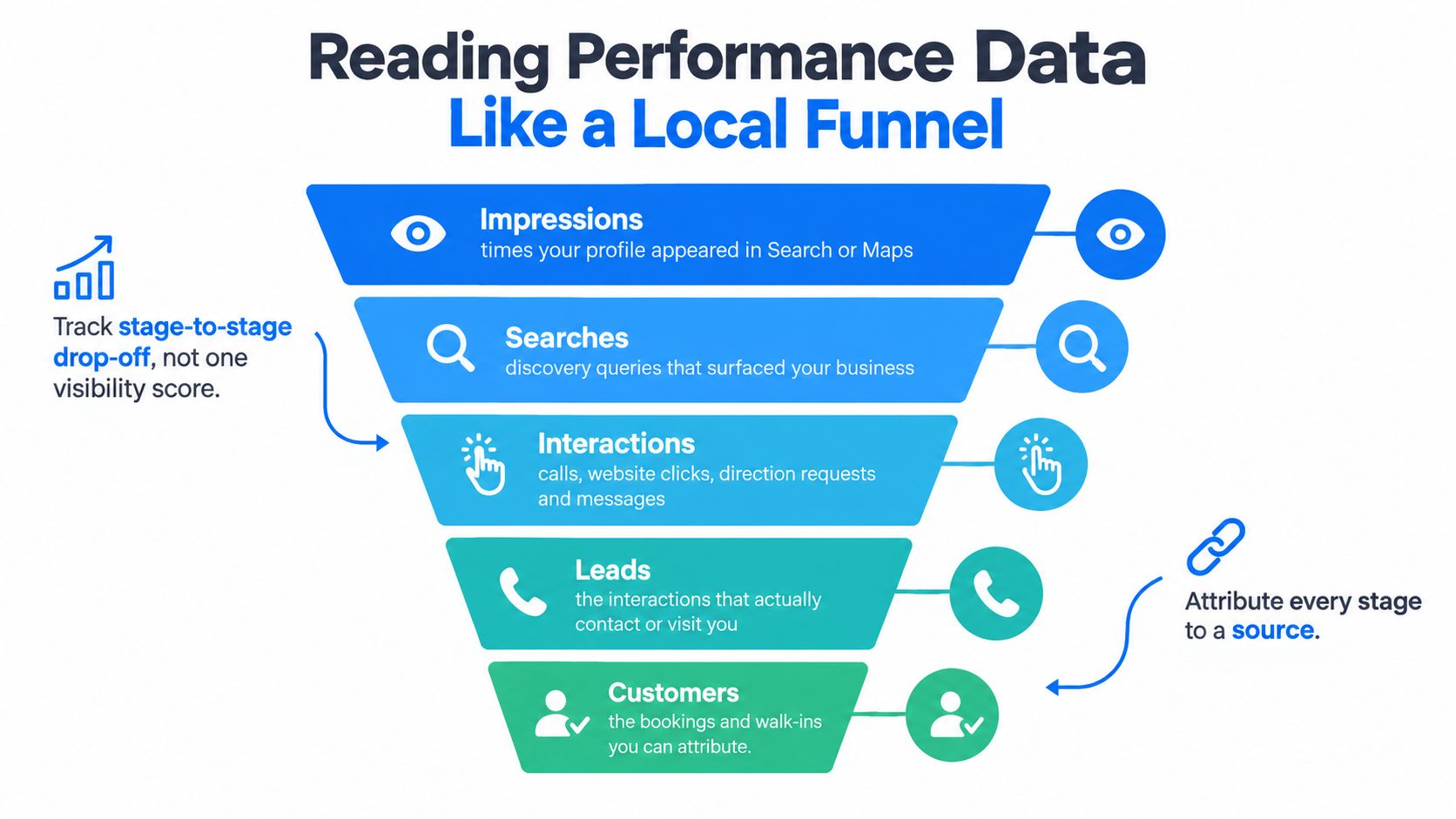
A verified Google Business Profile gives you more than a visibility snapshot. Google reports activity across Search and Maps, including views, search terms, calls, website clicks, messages, bookings, and direction requests. The practical question is where potential customers stop progressing from discovery to contact.
Use actions to diagnose the weak stage
Separate profile exposure from customer action. A listing may attract views while producing few calls, or generate calls without turning them into booked work. Each outcome points to a different problem, so changing profile text alone rarely fixes it.
For each action, calculate:
Action rate = actions ÷ profile views
Calculate the rate separately for calls, website clicks, messages, and directions. Compare equivalent time windows instead of judging one day in isolation. Google's interaction metrics update daily, and the interface history is limited, so export data through the available download or API when you need a durable record. Google's Business Profile performance guidance explains the available performance categories and reporting context.
- Views rising, calls flat: Ask whether the phone number works, the services match the search, the offer is clear, and the profile answers the searcher's immediate concern.
- Views stable, calls rising: Review what may be improving conversion, such as stronger reviews, clearer services, better photos, or more useful information.
- Website clicks rising, enquiries flat: Check the landing page, contact details, mobile experience, and conversion tracking.
- Directions rising, visits uncertain: Confirm that the address, opening hours, and map pin accurately describe a location customers can reach.
- Messages arriving without follow-up: Treat the gap as a response-workflow problem rather than a ranking problem.
A useful dashboard connects profile views with outcomes. Add call tracking where appropriate, record whether enquiries came from Maps or Search, and ask staff to mark whether each lead booked, needed a quote, or fell outside the service area. That turns profile reporting into an acquisition funnel instead of a vanity score.
For a broader framework on turning interest into action, see conversion funnel optimization.
Here's a practical visual walkthrough of how local discovery can move from exposure to customer action:
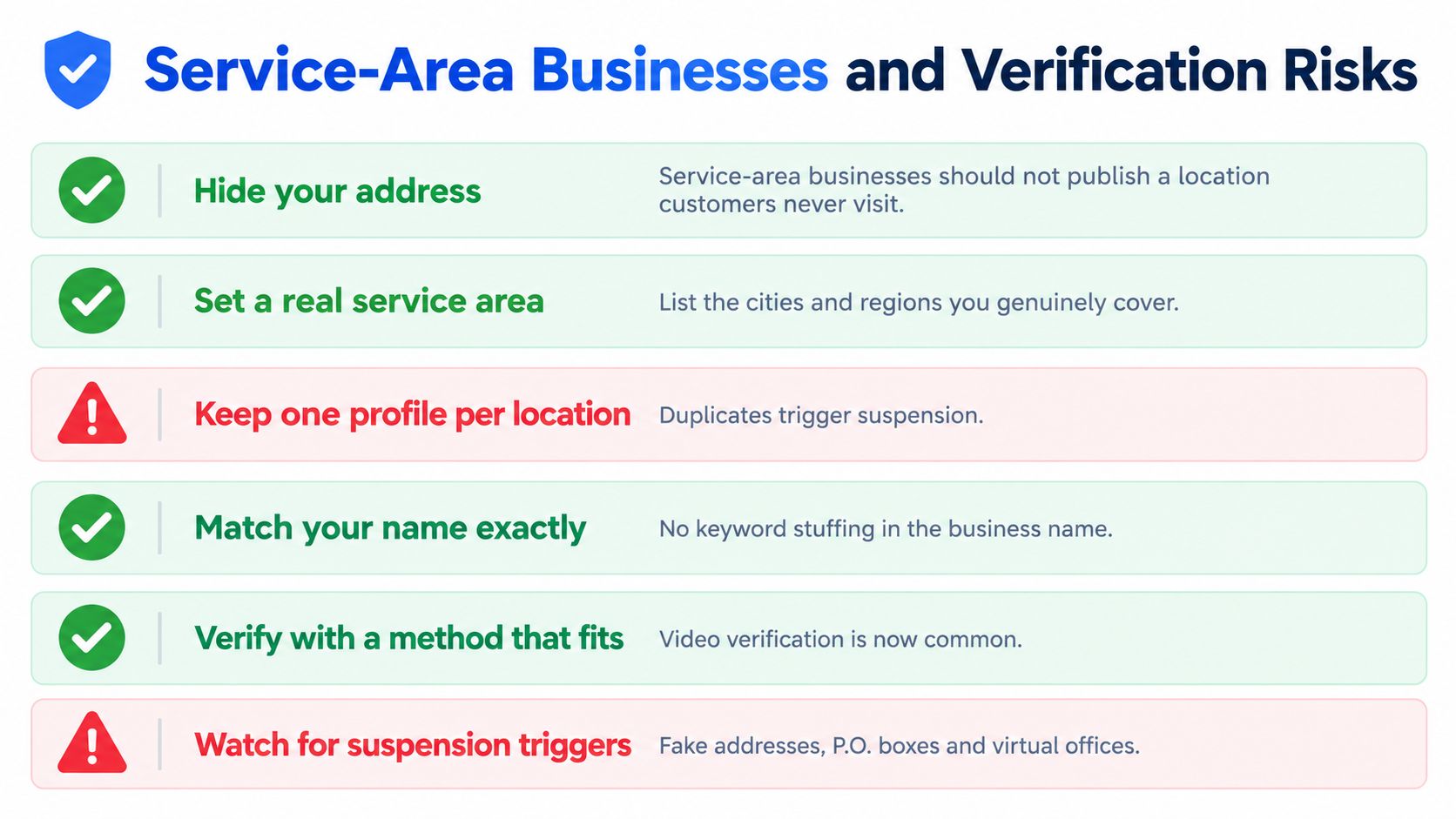
Service-Area Businesses and Verification Risks
A plumber who works at customers' homes isn't operating the same type of listing as a dental clinic with a public reception area. Treating both businesses alike creates one of the most common Google Business Profile problems: publishing an address that customers cannot visit.
For a service-area business, hiding the address and defining the areas served is often safer than displaying a residential or non-customer-facing location. The aim isn't to provide Google with as much location detail as possible. The aim is to provide accurate information that reflects how the business operates.
Choose the profile type before entering the address
Use this decision path:
- Customers visit a real business location: Publish the accurate address, make sure the map pin is correct, and prepare evidence that the business operates there.
- You travel to customers and they don't visit you: Hide the address and define the genuine service area.
- You do both: Follow Google's rules for the customer-facing location and clearly describe the mobile service coverage.
- You use a home office: Don't assume a residential address should be public. Decide whether customers can visit and whether the location can be verified under Google's requirements.
Google may request real-time mobile video showing the location, signage, equipment, and evidence of operations. Processing can take up to seven days, according to the available Google Business Profile suspension guidance.
Protect ownership and address consistency
Suspensions can interrupt calls, directions, reviews, and customer trust. Common risk signals include inaccurate addresses, virtual offices, duplicate profiles, rapid edits, and contradictory address information across directories. A profile connected to a restricted Google account may also affect other profiles connected to that account.
Keep the operating details consistent across your website and authoritative directories. Don't create separate listings for every town you serve when there isn't a legitimate location for each one. Don't add keywords to the business name to force extra relevance. The profile name should represent the real-world business name.
For a service-area business, less public location detail can be more accurate and safer.
Before verification, prepare business evidence, confirm who owns the Google account, review every address signal, and decide who will handle support if Google asks for clarification. A short-term visibility tactic isn't worth a long-term listing disruption.
Responsiveness and Messaging Decisions
Messaging is not an optimization checkbox. It creates a customer promise, whether the business intends to make that promise or not. If a customer sends an urgent request through a profile and nobody monitors the inbox, the listing may generate interest that the business cannot convert.
Recent consumer research reports that 20% of consumers expect a business to respond to reviews within 24 hours, as summarized in the available Google Business Profile statistics research. The same source reports that only about 32% of listings have messaging enabled, while listings with messaging enabled receive 29% more direct customer interactions. These are industry-reported figures, not a guarantee that enabling messaging will improve every business's results.
Decide whether the team can support the channel
Before enabling messaging, assign a person responsible for monitoring it. Define what happens during business hours, evenings, weekends, holidays, and periods when the usual contact is unavailable.
A small electrical company might use messaging for quote requests but route emergency work to a verified phone number. A cleaning company may ask for property type, location, preferred date, and service scope before confirming availability. A dental office may need a clear distinction between appointment enquiries and clinical emergencies.
The response workflow should answer four questions:
- Who owns the inbox: Name a person or role, not “the marketing team.”
- What happens first: Set a response standard for reviews and a separate process for new leads.
- When does a message become a call: Define escalation for urgent work, complex questions, or incomplete contact details.
- What happens after hours: State when someone will reply instead of implying instant availability.
Reviews and leads need different treatment
A review response is public reputation management. A message is a private sales or service conversation. Both require care, but they shouldn't use the same script or priority.
Respond to reviews with specific, professional language that acknowledges the customer's experience without exposing private details. For messages, verify the phone number, record the request, qualify the job, and confirm the next step. Automated replies can acknowledge receipt, but they shouldn't claim a human is available when nobody is monitoring the channel.
Enabling messaging makes sense when the business has ownership, routing, phone verification, and follow-up in place. Leaving it off can be wiser than opening a channel that produces unanswered enquiries. The profile should match the company's actual capacity, not an idealized service promise.
BenjiAds helps local service businesses connect advertising, landing pages, tracking, and SMS-based lead follow-up in one workflow, with campaigns prepared for approval before they run. If your Google Business Profile is generating discovery but your team needs a clearer system for capturing and responding to enquiries, visit benjiads to review the platform.
- google my business page
- local seo
- google business profile
- local business
- map seo
Done for you
Ads that text you customers.
- ✓ Ads created for you
- ✓ Every lead texts your phone
- ✓ Free to use, no credit card
748+ local businesses run ads with benjiads