Source: https://benjiads.com/blog/where-do-google-ads-appear
Publisher: benjiads, https://benjiads.com
Published: 2026-10-04
Updated: 2026-10-04
Cite as: benjiads, "Where Do Google Ads Appear? a Complete Placement Guide", benjiads.com/blog/where-do-google-ads-appear
Reuse: you may quote this article with attribution and a link to the source.
# Where Do Google Ads Appear? a Complete Placement Guide
Discover where do google ads appear across Search, Display, YouTube, Maps, and partner sites. Learn how placements work and how to control them.
Google Ads can appear on Google Search results, across the Display Network's 35 million websites and apps, and on YouTube, Gmail, Google Maps, Google Play, and Discover, depending on the campaign type. They may also reach people through other Google surfaces and partner sites, so the ad someone sees isn't always tied to a traditional keyword search.
You may be asking this because you launched a campaign, checked the search results, and still can't explain where the clicks came from. A local plumber might expect every impression to come from someone searching for an emergency repair, yet the campaign can reach people in several different settings across Google's ecosystem.
## Table of Contents
- [The Hidden Geography of Your Ads](#the-hidden-geography-of-your-ads)
- [The question behind the question](#the-question-behind-the-question)
- [Understanding What a Placement Actually Is](#understanding-what-a-placement-actually-is)
- [Read a placement as a serving location](#read-a-placement-as-a-serving-location)
- [The Major Networks Where Ads Live](#the-major-networks-where-ads-live)
- [Search captures an active moment](#search-captures-an-active-moment)
- [Display creates a broader context](#display-creates-a-broader-context)
- [Google-owned surfaces add more routes](#google-owned-surfaces-add-more-routes)
- [How Automation Is Changing Placement Control](#how-automation-is-changing-placement-control)
- [Manual settings are not the whole map](#manual-settings-are-not-the-whole-map)
- [Tools to Monitor and Control Your Placements](#tools-to-monitor-and-control-your-placements)
- [Use diagnosis before making assumptions](#use-diagnosis-before-making-assumptions)
- [Read reports at the right level](#read-reports-at-the-right-level)
- [Key Takeaways for Strategic Advertisers](#key-takeaways-for-strategic-advertisers)
## The Hidden Geography of Your Ads
A plumbing business owner starts with a simple idea: show an ad when someone searches for “emergency plumber.” The campaign goes live, but the early results don't line up neatly with that expectation. Some visitors arrive after searching, while others may have encountered the business while browsing a website, watching a video, checking Gmail, or using Google Maps.
That confusion usually comes from treating Google Ads as one advertising location. It isn't. Google Ads is more like a network of roads connected to the same transport system. Search is one road, YouTube is another, and the Display Network branches into websites and apps that people use for entirely different reasons.
### The question behind the question
When people ask **where do Google Ads appear**, they often mean, “Where can my budget be spent?” The practical answer depends on the campaign type, targeting settings, ad format, and Google's matching systems.
Ads can show in:
- **Google Search results**, when people submit relevant queries.
- **The Display Network**, across websites and apps.
- **YouTube**, including video-related surfaces.
- **Gmail**, where ads can appear within the inbox experience.
- **Google Maps**, which can matter greatly for local services.
- **Google Play and Discover**, depending on the campaign and format.
- **Partner sites and other Google surfaces**, where the selected campaign is eligible to distribute ads.
The first step toward control is to stop thinking about one fixed page. Your ad has a potential geography, not a single address. The rest of the work involves finding out which roads your campaign used and whether those roads led to useful customers.
## Understanding What a Placement Actually Is
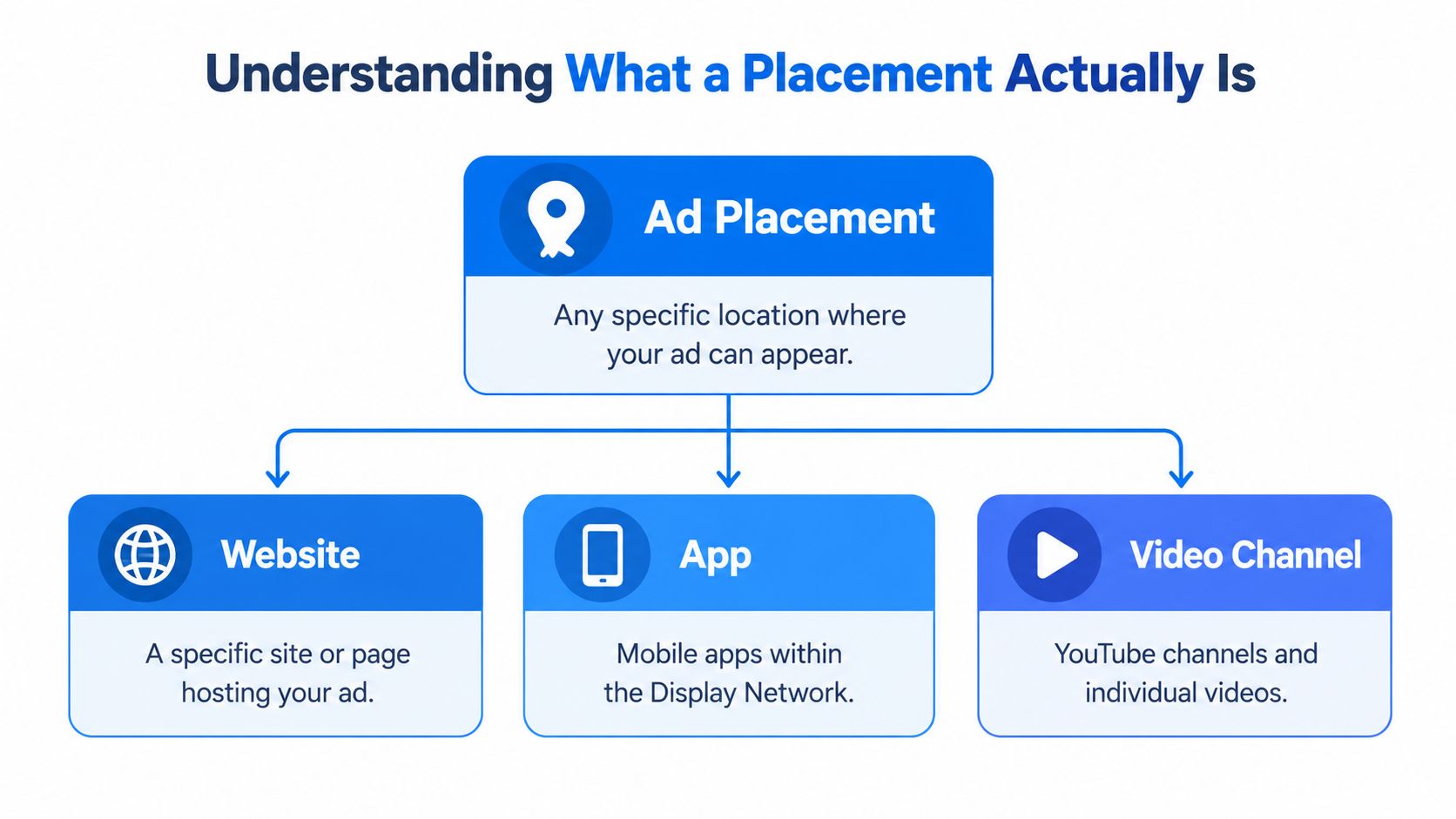
A **placement** is not just a website name. Google defines it at a more detailed serving level. It can refer to an entire website, a particular page, an individual ad unit, a specific YouTube video, or a mobile app, as described in [Google's placement documentation](https://support.google.com/sa360/answer/9577332?hl=en).
That distinction changes how you read a report. Suppose an ad appears on a large publisher's domain. That doesn't necessarily mean the whole site was relevant to your campaign. The actual placement might have been one article, one page category, or one ad unit. Likewise, a YouTube placement may identify a particular video rather than every video on the channel.
### Read a placement as a serving location
A useful mental model is to move from broad category to precise location:
1. **Network:** Search, Display, or a Google-owned surface.
2. **Property:** A website, app, YouTube environment, or Google product.
3. **Content location:** A page, video, screen, or ad unit.
4. **Serving event:** The moment Google matched the ad to a person, query, context, or signal.
Google can use placements you deliberately choose, but it can also select them automatically through keywords and other targeting signals. That means an advertiser's intended audience and the final serving location aren't always identical.
> **Practical rule:** Treat every placement report as a map of actual delivery, not a list of websites you vaguely associated with your audience.
This level of detail helps explain apparently unrelated traffic. A page may have matched a contextual theme, a visitor's broader interest, or another campaign signal even if the domain doesn't look like an obvious fit. Review the exact page, app, video, or ad unit before deciding whether the placement is useful or wasteful.
## The Major Networks Where Ads Live
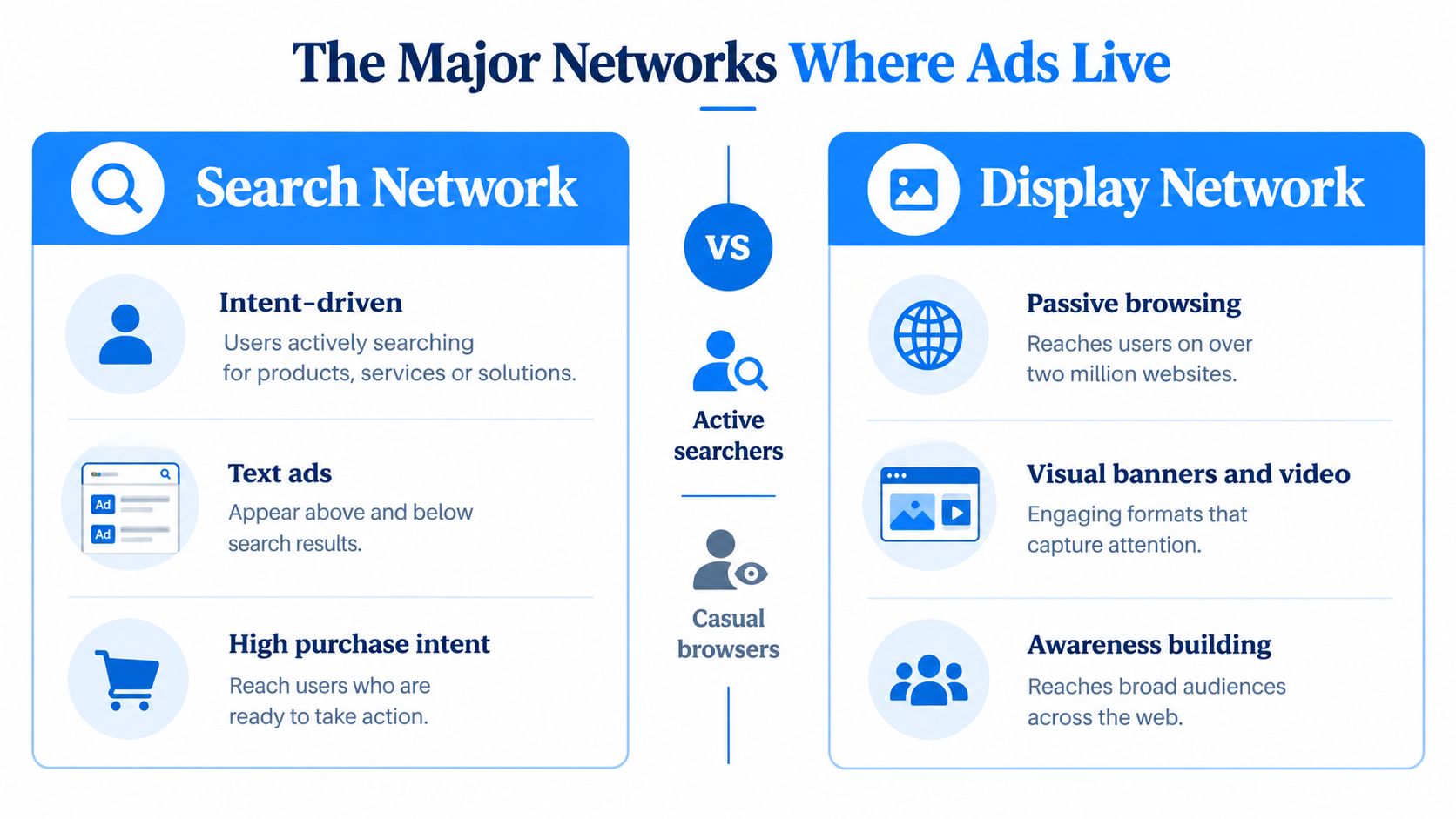
Google Ads distributes advertising across different environments, and people behave differently in each one. The [Google Ads network overview](https://support.google.com/google-ads/answer/1704373?hl=en) identifies the Search Network and Display Network as major parts of that ecosystem. It also explains that eligible ads can appear on Google properties such as YouTube and Gmail, as well as Google Search, Maps, the Shopping tab, Google Play, Discover, and partner sites, depending on campaign type and format.
### Search captures an active moment
The Search Network reaches people who have typed a query. Someone searching for “water heater repair near me” has created an immediate context for the ad. Search placements are therefore closely tied to the wording, intent, location, and timing of the query.
A search ad can meet a person at the decision point. The person may be comparing providers, checking availability, or looking for a solution to an urgent problem. That doesn't guarantee a conversion, but the surrounding behavior is different from someone casually reading an article.
### Display creates a broader context
The Display Network reaches people across **35 million websites and apps worldwide**, according to Google's documentation. Display ads can appear while people read, browse, use an app, or consume other content rather than actively searching for the advertised service.
That setting suits visual awareness and reminder campaigns, but it requires careful interpretation. A click from a page isn't automatically evidence of strong buying intent. The advertiser should evaluate the placement and the resulting behavior together.
### Google-owned surfaces add more routes
YouTube, Gmail, Maps, Google Play, and Discover can each place an ad in a different user experience. A local business might care particularly about Maps because the person is already exploring nearby businesses, while a video campaign may reach someone watching home repair content.
The right campaign isn't the one with the longest distribution list. It's the one whose eligible surfaces match the action you want. For a closer look at local campaign decisions, see this [guide to Google Ads for local businesses](https://benjiads.com/blog/google-ads-local).
## How Automation Is Changing Placement Control
Older explanations often make Google Ads sound like a simple equation: choose a keyword, choose a website, and the ad appears there. That description no longer captures the full experience. Google's systems increasingly use automation and broader matching signals to decide where an eligible ad may reach a person.
The result is a trade-off. Automation can help a campaign discover relevant opportunities that a marketer didn't manually identify. At the same time, it can make delivery harder to predict, especially when the advertiser assumes that a selected keyword or placement acts like a strict boundary.
### Manual settings are not the whole map
Campaign automation can connect an ad with several signals at once. These may include the user's query, context, device, location, audience relationship, and the surface where the interaction occurs. The advertiser may define the campaign's direction, while Google's systems determine many individual delivery decisions.
That matters for local businesses. A service ad may reach someone through Search, Maps, a partner site, or another Google surface rather than only through the main search results page. The campaign's settings establish eligibility, but the actual impression still depends on the auction and matching process.
Google's current advertising direction also includes AI-influenced experiences and broader distribution across Search, YouTube, Gmail, Maps, Discover, and the Display Network. Some current coverage also identifies AI Overviews and AI Mode as emerging search experiences connected to advertising reach, as described on [Google's Ads business page](https://business.google.com/en-all/google-ads/).
> Automation is useful for finding possibilities. It shouldn't replace the habit of checking where your ads actually appeared.
For advertisers, the practical response isn't to reject automation automatically. It's to pair automated delivery with regular diagnosis. If a placement produces attention but no meaningful business action, the report should reveal that pattern before the campaign continues on autopilot. For campaigns that depend on follow-up after a click, [remarketing ads and audience strategy](https://benjiads.com/blog/remarketing-ads-google) can also help organize later interactions without assuming that every first impression will convert.
## Tools to Monitor and Control Your Placements
Control starts with visibility. If you only watch total impressions, clicks, and conversions, you may miss the environments consuming attention and budget. A placement review adds the missing detail by showing where the ad served and how those locations relate to campaign outcomes.
### Use diagnosis before making assumptions
Google's **Ad Preview and Diagnosis tool** helps advertisers inspect how an ad may appear for a specific search request without treating the search like a normal personal test. This is useful when a business owner says, “I searched for my service and didn't see my ad.” The result can vary by query, context, eligibility, and timing, so one manual search isn't a complete delivery report.
Use the tool to check a realistic query and location. Then compare that observation with the campaign's reporting rather than drawing conclusions from a single search result.
### Read reports at the right level
Placement reporting is most useful when you ask focused questions:
- **What served:** Identify the websites, pages, apps, videos, or YouTube surfaces where impressions occurred.
- **What attracted action:** Compare clicks with leads, calls, form submissions, or another meaningful conversion.
- **What looks mismatched:** Flag locations that attract activity but don't fit the service, audience, or brand context.
- **What deserves review:** Look for repeated delivery in a small group of placements or an unexpected concentration in one type of inventory.
You can then use exclusions or negative placements where the campaign supports them. The goal isn't to block every unfamiliar location. It's to remove placements that clearly conflict with the campaign's purpose while preserving room for relevant discovery.
A tracking system should connect the placement with what happened afterward. [Ad tracking software](https://benjiads.com/blog/ad-tracking-software) can help teams bring campaign activity and lead outcomes into the same review process, but the operating principle stays simple: inspect delivery, connect it to outcomes, and make deliberate adjustments.
Set a recurring review rather than waiting for a budget problem. Placement control is less like locking a door and more like checking a building's rooms regularly. You want to know which rooms are useful, which are noisy, and which should remain closed.
## Key Takeaways for Strategic Advertisers
The answer to **where do Google Ads appear** has two layers. The first is the visible list: Search, Display, YouTube, Gmail, Maps, Google Play, Discover, and other eligible surfaces. The second is the operational reality: a placement can be a specific page, app, video, or ad unit, and Google's systems may select the final serving location automatically.
That distinction changes how you manage campaigns. A campaign isn't fully understood when you know its headline, keyword theme, or selected network. You understand it when you can connect the network to the actual placement and then connect that placement to a meaningful business result.
Keep these principles in view:
- **Choose for context:** Search, Display, video, Maps, and other surfaces create different user situations.
- **Inspect delivery:** Reports reveal where ads are served, not just where you expected them to serve.
- **Respect automation:** Automated matching can find opportunities, but it can also reduce predictability.
- **Use diagnosis:** The Ad Preview and Diagnosis tool helps you investigate specific search experiences.
- **Protect relevance:** Exclude placements that don't fit the audience, offer, or brand environment.
- **Measure outcomes:** A click matters less than the lead, call, booking, or sale that follows.
The strongest approach balances Google's reach with human oversight. Let automation explore, but keep the reporting, diagnosis, and exclusion decisions tied to the customers you want to serve.
---
benjiads offers local businesses software for ad setup, landing funnels, conversion tracking, lead delivery, and SMS follow-up, with campaigns prepared for approval before they run. Visit [benjiads](https://benjiads.com) to see how its workflow can help connect advertising activity with the leads that follow.