Source: https://benjiads.com/blog/how-do-i-leave-a-review-on-google
Publisher: benjiads, https://benjiads.com
Published: 2026-10-16
Updated: 2026-10-16
Cite as: benjiads, "How Do I Leave a Review on Google: A Practical Guide", benjiads.com/blog/how-do-i-leave-a-review-on-google
Reuse: you may quote this article with attribution and a link to the source.
# How Do I Leave a Review on Google: A Practical Guide
Learn how do I leave a review on Google from desktop or mobile, write reviews that stick, and avoid common mistakes. Plus tips for businesses
You've just had a plumber fix a leaking valve, a dentist finally solve a stubborn problem, or a photographer deliver wedding images you'll keep forever. You're holding your phone, you want to help, and the question is simple: **how do I leave a review on Google?**
The process is quick, but the quality of the review matters. A useful review helps neighbors choose confidently, gives a local business feedback it can act on, and gives Google a genuine account of what happened. The wrong location, vague praise, copied wording, or an incentive-for-rating arrangement creates problems for everyone.
This guide covers the exact desktop and mobile steps, what to write, what Google removes, and how local businesses can request reviews without crossing the line.
## Table of Contents
- [When You Actually Want to Leave a Google Review](#when-you-actually-want-to-leave-a-google-review)
- [Writing a Review from Your Computer](#writing-a-review-from-your-computer)
- [Using Google Search](#using-google-search)
- [Using Google Maps on a computer](#using-google-maps-on-a-computer)
- [Posting a Review from Your Phone](#posting-a-review-from-your-phone)
- [The Google Maps app route](#the-google-maps-app-route)
- [If your phone opens Google Search first](#if-your-phone-opens-google-search-first)
- [What Actually Makes a Review Helpful](#what-actually-makes-a-review-helpful)
- [Start with the facts you remember](#start-with-the-facts-you-remember)
- [Use photos with restraint](#use-photos-with-restraint)
- [What Google Actually Removes and Why It Matters](#what-google-actually-removes-and-why-it-matters)
- [Honest criticism is different from prohibited content](#honest-criticism-is-different-from-prohibited-content)
- [How Local Businesses Can Request Reviews Without Crossing the Line](#how-local-businesses-can-request-reviews-without-crossing-the-line)
- [A compliant request sounds like this](#a-compliant-request-sounds-like-this)
- [The One Rule Worth Remembering](#the-one-rule-worth-remembering)
## When You Actually Want to Leave a Google Review
The best time to write a review is usually right after the experience, while the details are still clear. Your HVAC technician has finished the repair, the system is running again, and you remember that the technician explained the fault, protected the floor, and cleaned up before leaving. Those details are more useful than “Great service.”
Or the experience went badly. A dental appointment ran late, the explanation was unclear, and the final charge differed from what you understood. You can still write a review, but separate what you personally experienced from assumptions about the business. Specific criticism is more credible than an angry generalisation.
A wedding photographer creates a different kind of review moment. You may want to praise communication, punctuality, direction during the day, and the quality of the finished images. Future customers are looking for those practical signals, not just a string of superlatives.
> **Practical rule:** Write about what happened, not what you think other customers should believe.
Before selecting **Post**, make three decisions:
- **Choose the correct business:** Chains, franchises, and service-area companies can have similar names. Confirm the address or branch.
- **Give an honest rating:** Your stars should match your overall experience, not a request from the business.
- **Protect other people's privacy:** Don't include private contact details, sensitive information, or identifiable details about someone who didn't agree to be mentioned.
A review also becomes part of a local business's public reputation. Someone comparing plumbers, photographers, dentists, or landscapers may use your words to decide whom to contact. Businesses that invest in their local presence should also understand how reviews fit into broader [small business SEO guidance](https://benjiads.com/blog/small-business-seo), especially when customers are comparing several nearby providers.
For businesses with distinctive premises, a review can work alongside visual trust signals such as [360° Street View tour ideas](https://virtualtoureasy.com/google-street-view-virtual-tours). A customer's firsthand account and an accurate view of the location answer different questions, but together they make the profile easier to evaluate.
## Writing a Review from Your Computer
Start by signing in to a **Google Account**. You don't need a Gmail address. Google allows a non-Gmail email address to be used when creating the required account, as explained in its [Business Profile review guidance](https://support.google.com/business/answer/3474122?hl=en).
### Using Google Search
Open Google Search and enter the business name, followed by the town or area if the name is common. The business profile panel should appear beside or above the results. Check the **business name, address, and branch** before doing anything else.
Select the review option, usually labelled **Write a review**. Google will open a review window where you can:
- Select a star rating from **one to five stars**.
- Add written comments about your genuine experience.
- Include relevant photos if you have them.
- Select **Post** when the review is ready.
The location check matters more than people think. A chain may have several branches with nearly identical names, while a mobile tradesperson may serve an area without having a traditional storefront. If the profile doesn't match the business you visited or hired, stop and search again.
### Using Google Maps on a computer
You can begin in Google Maps instead. Search for the business or location, select the correct listing, and open its profile. Look for the reviews area and choose **Write a review**.
Write for a stranger who has never used the business. “Amazing” tells them almost nothing. “The electrician identified the faulty outdoor connection, explained the repair, and left the area tidy” gives them information they can weigh.
Don't add promotional copy, copied text, or claims about services you didn't receive. Google's guidance expects reviews to reflect a real customer experience, and businesses aren't allowed to manipulate ratings or offer incentives for reviews.
If you make an error after publishing, Google Maps provides options to edit or delete your review from your contributor profile. Correcting a wrong branch, date, or factual detail is better than leaving an inaccurate post in place.
## Posting a Review from Your Phone
Users will use the Google Maps app because the location and contribution tools are already built into the mobile experience. Labels can look slightly different on iPhone and Android, but the route is consistent.
### The Google Maps app route
Open Google Maps and sign in. Tap **Contribute**, then select **Write review**. Choose the business or location, verify that it's the right listing, and continue to the review screen. Google describes the mobile sequence as **Google Maps → Contribute → Write review → select the location → rate, write, optionally add photos, and submit** in its [Google Maps review instructions](https://support.google.com/maps/answer/6230175?hl).
Choose your star rating first, then write the explanation. Photos are optional, but a relevant image can help when it shows the finished work, the space, a menu item, or another part of the customer experience. Don't upload images that expose private information about another person.
The correct listing check is especially important on a phone. Maps may suggest nearby businesses, and a chain can have multiple branches within a short distance. Compare the name and address with your receipt, appointment message, or memory of the visit before you submit.
### If your phone opens Google Search first
You can also search for the business in a mobile browser or the Google app. Open the business profile, find the review option, and follow the same rating and writing process. If the page keeps redirecting you to Maps, use the app route instead of fighting the browser.
Keep the wording natural. A short review can still be valuable if it contains one concrete detail, such as how clearly the technician explained the repair or whether the photographer kept the schedule organised.
After selecting **Post**, return to your contributor profile if you need to change something. Google Maps supports editing and deleting your own reviews. Use that option when you selected the wrong location, misstated a fact, or want to clarify what happened.
## What Actually Makes a Review Helpful
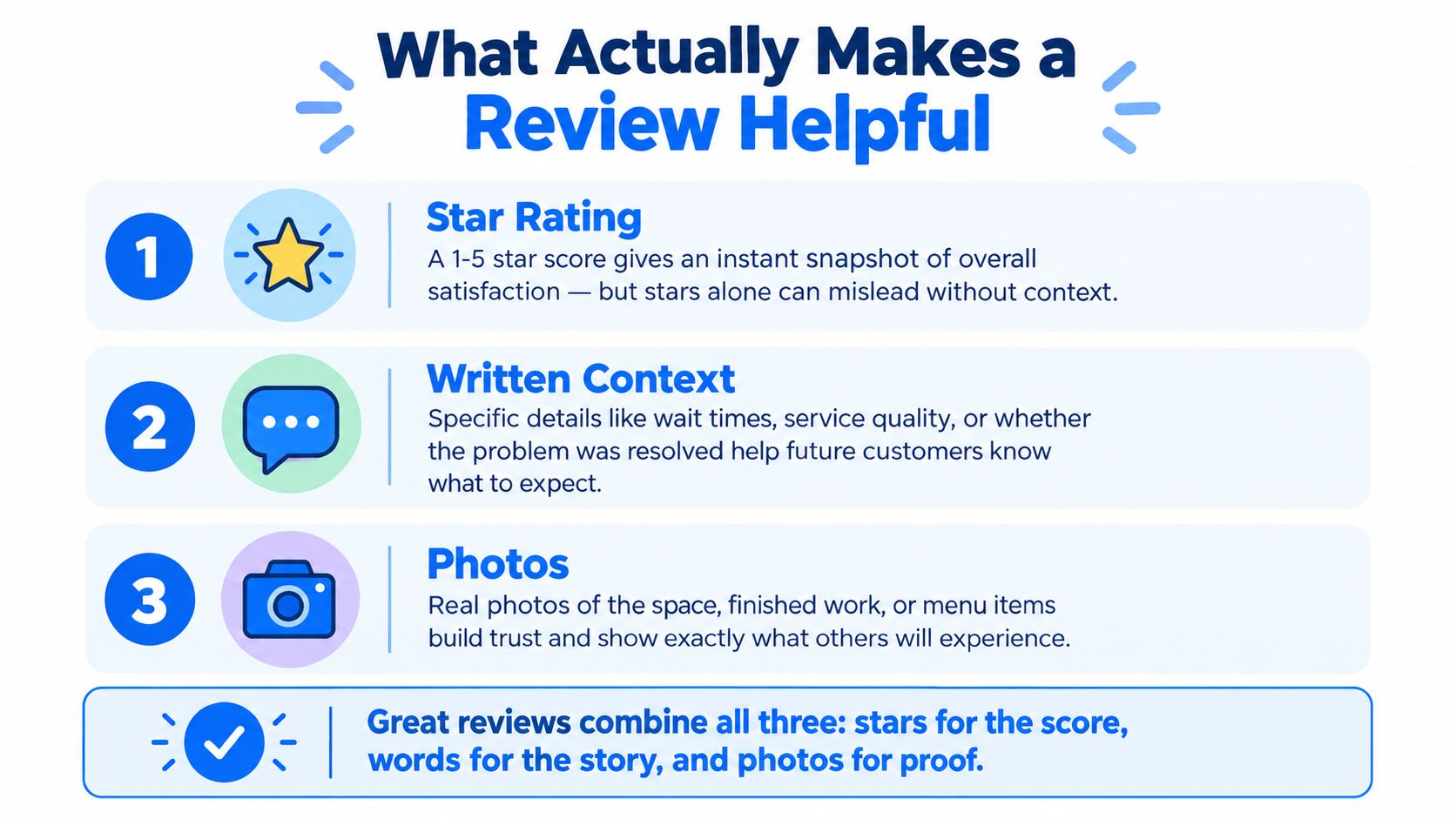
A useful review has three parts: **the rating, the context, and supporting evidence**. The stars provide a fast summary, but the written explanation tells future customers how to interpret that score. A photo can show the result or setting when words aren't enough.
### Start with the facts you remember
Think through the customer journey:
- **The problem:** What did you need help with?
- **The service:** What did the business do?
- **The useful detail:** How was communication, timing, cleanliness, or follow-through?
- **The outcome:** Was the problem resolved, partly resolved, or left unresolved?
A thin review says, “Good company, would recommend.” A stronger version says, “The plumber arrived when scheduled, found the source of the leak under the sink, explained the repair before starting, and tested the connection afterward.”
Negative feedback benefits from the same discipline. “Terrible business” gives nobody a clear next step. “The appointment started late, I wasn't told about the delay, and the final explanation didn't address the issue I booked for” is firm, specific, and easier for a business to investigate.
### Use photos with restraint
Upload photos that document your own experience. A finished landscaping project, the repaired fixture, a clean studio, or a meal you ordered can add useful context. Avoid private documents, personal phone numbers, faces of uninvolved people, and anything unrelated to the visit.
Don't turn the review into an advertisement. Promotional slogans, repeated marketing language, and copied wording can make a genuine experience look manufactured.
If you later spot an error, edit or delete your own review through your Google Maps contributor profile. Fixing the record is the responsible choice. Don't ask the business to reward you for changing the rating, and don't revise the review to satisfy a request for particular wording.
## What Google Actually Removes and Why It Matters
A negative review isn't automatically removable. Google doesn't remove content because a business dislikes it or disputes the customer's assessment. The important question is whether the content violates a policy or applicable law.
Google reported **221 million fake and misleading local reviews removed globally in 2025** in its [Maps content enforcement report](https://transparencyreport.google.com/maps-content/enforcement). That figure reinforces a practical point: Google is looking for manipulation, deception, and prohibited content, not a profile made uniformly positive.
### Honest criticism is different from prohibited content
| Reviewer wrote | Outcome |
|---|---|
| “The repair solved the leak, but the appointment began later than expected.” | Honest criticism can remain. |
| “The staff were rude,” with no further detail | It may remain if it reflects a genuine experience, though specific context is more useful. |
| A review copied from another customer or posted without using the business | Likely prohibited as fake or irrelevant content. |
| A review attacking an employee with personal insults or unrelated accusations | May violate rules on personal attacks or irrelevant content. |
| A review published after receiving payment or a gift for the rating | Prohibited incentive-based or manipulated content. |
Reviewers should edit or delete their own post when it contains a mistake. Businesses and users should flag content only when they can identify a policy or legal issue. A disagreement over price, quality, or service outcome usually isn't enough by itself.
Businesses should also stop treating removal requests as a shortcut for reputation management. A practical [Google Business Profile review removal guide](https://thebestreputation.com/guide/google-business-profile-review-removal-request/) can help identify the difference between a reportable violation and ordinary criticism. If the review is harsh but genuine, the better response is usually a calm public reply and an effort to resolve the underlying complaint.
The same discipline applies to business profiles more broadly. Accurate profile information and a clear [Google Business Profile management approach](https://benjiads.com/blog/google-my-business-page) matter more than trying to erase every uncomfortable opinion.
Never offer a discount, gift, cash payment, or other benefit in exchange for posting, revising, or deleting a review. Google prohibits incentives and attempts to manipulate ratings. A business that pays for a changed review undermines the very trust its profile is supposed to build.
## How Local Businesses Can Request Reviews Without Crossing the Line
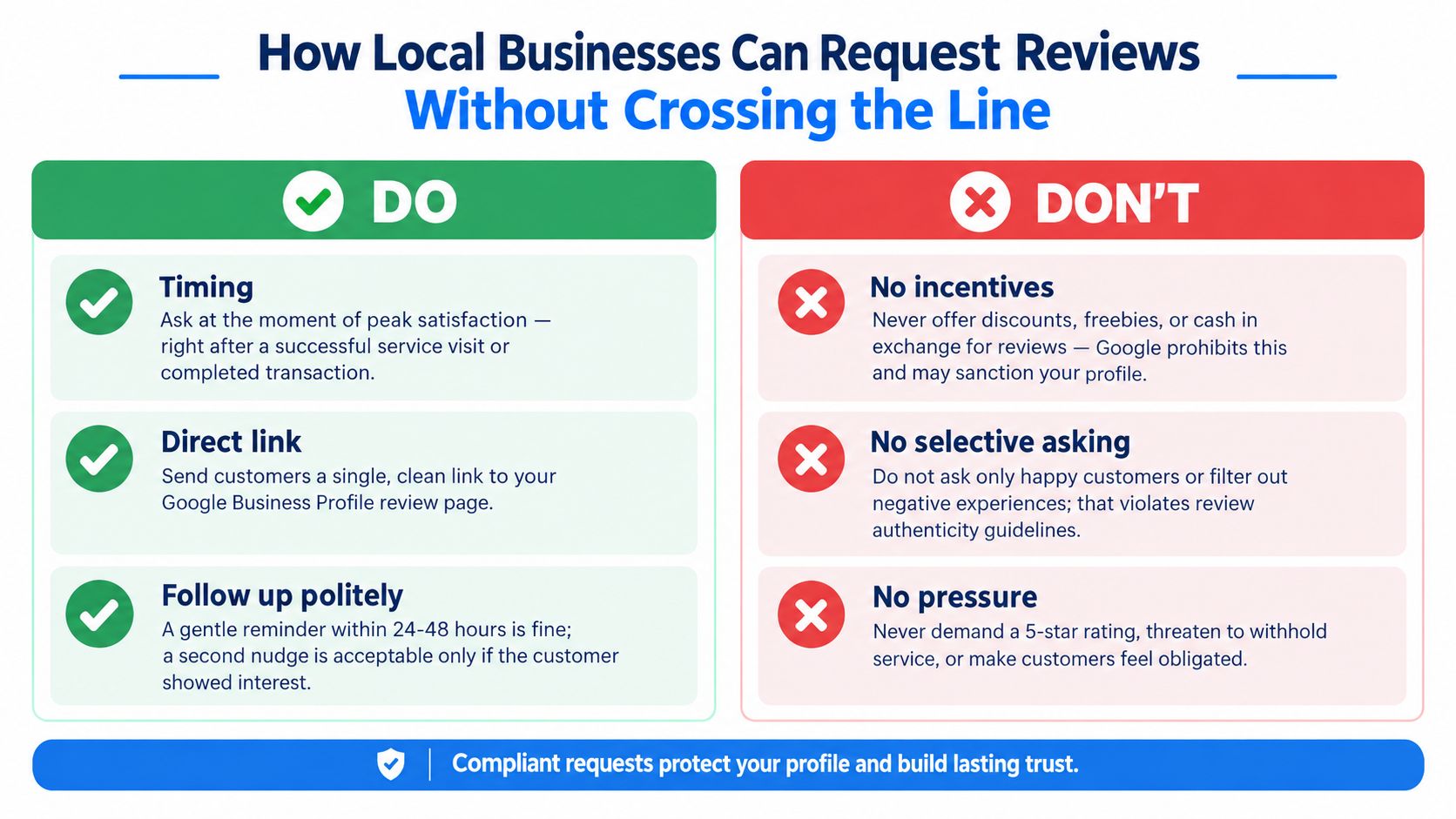
A business can ask customers for reviews. The safe method is simple: ask after a completed purchase or service, make the request easy to act on, and leave the customer free to describe the experience.
Google's Business Profile guidance supports direct review links and QR codes. A contractor can include a review link in a post-job text message, place a QR code on an invoice, or add one to a receipt. If you need to create the destination, this resource on [how to generate a Google review link](https://digitalskyrocket.com/how-to-generate-a-google-review-link/) offers a practical starting point.
### A compliant request sounds like this
“Thanks for choosing us today. If you'd like to share your experience, you can leave an honest Google review here: [review link].”
That message doesn't request a particular star rating or dictate the wording. It gives every customer the same opportunity instead of asking only people the team expects to be enthusiastic.
Avoid discounts, gifts, cash, or free add-ons tied to a review. Don't ask a customer to remove a negative review in exchange for a refund or future service. Don't screen customers through a private form and send only satisfied people to Google.
> Ask for an honest review, not a positive review.
A polite reminder can be useful when the first message gets buried, but repeated pressure makes the request feel compulsory. Train staff to ask once at a natural moment, such as after a successful installation, completed cleaning, or delivered gallery. The customer should never feel that a rating is part of the service obligation.
Local businesses should also keep the operational basics clean. Send the correct profile link, use the correct branch, and make sure the business name and address are accurate. A frictionless request helps genuine customers respond without turning the process into a ratings campaign.
For broader customer acquisition, review requests should sit alongside a sensible [local business internet marketing strategy](https://benjiads.com/blog/local-business-internet-marketing), not replace good service or reliable follow-up.
## The One Rule Worth Remembering
Write what happened, make it specific, and keep it truthful. Reviewers shouldn't accept compensation for changing a rating. Businesses should ask for feedback, but they shouldn't buy it, filter it, or script it.
Use this quick checklist:
- **Right place:** Confirm the business name and location.
- **Real experience:** Write only about what you experienced.
- **Useful detail:** Include the problem, service, and outcome.
- **Privacy check:** Remove private information and unrelated material.
- **No manipulation:** Don't request a rating, offer an incentive, or trade compensation for a revision.
- **Fix mistakes:** Edit or delete your own review when necessary.
For unusual cases, check Google's current Business Profile and Maps guidance before posting or reporting content. The rules are easier to follow when you focus on authenticity rather than trying to force every review to look positive.
---
BenjiAds helps local service businesses turn paid advertising, landing pages, lead tracking, and SMS follow-up into one managed workflow, so review requests can follow a completed job instead of getting lost in the day-to-day rush. Visit [benjiads](https://benjiads.com) to see how the platform can support a more consistent customer acquisition and follow-up process.